

How to open an account an ASNB account offline (Part 3)
In Part 1 of my Amanah Saham article, I covered an overview of Amanah Saham investing and the benefits and risks of putting your money in Amanah Saham. For Part 2, we took an in-depth look into all 6 Fixed Price Funds by Amanah Saham (eg. Their stellar return).
p
(1) Account Opening Process
Opening an ASNB account is relatively straightforward. You can either visit any of the ASNB’s branches or its agents to open your ASNB account – be sure to bring along minimum cash of RM10 for initial investment!
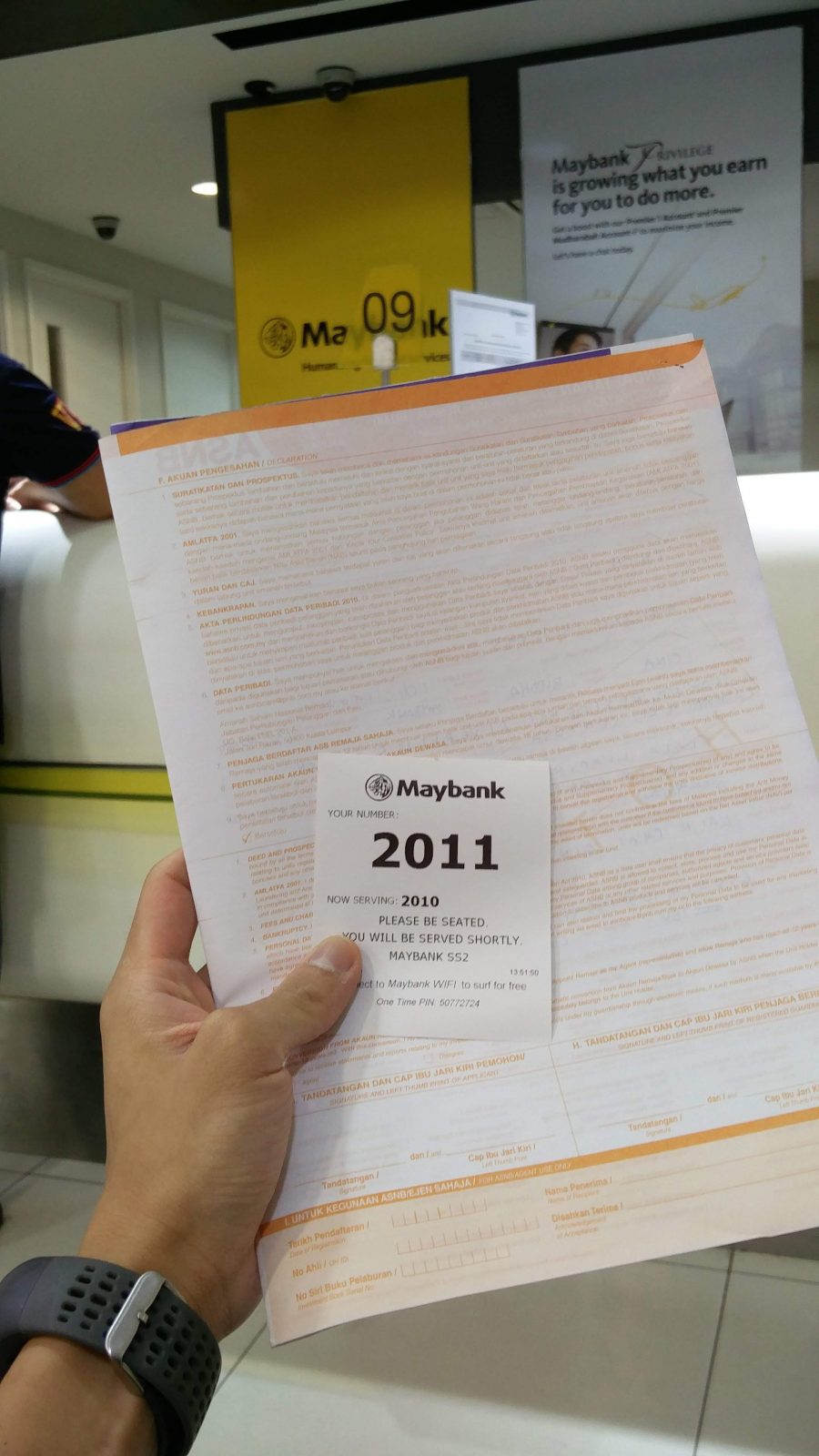
For myself, I went to one of the Maybank branches nearby to apply for my ASNB account. While the process is straightforward, there are quite a number of declaration and Know-Your-Customer (KYC) forms to fill up. (Note: Individual below 18 years old will need to have his/her guardian’s details filled up as well)
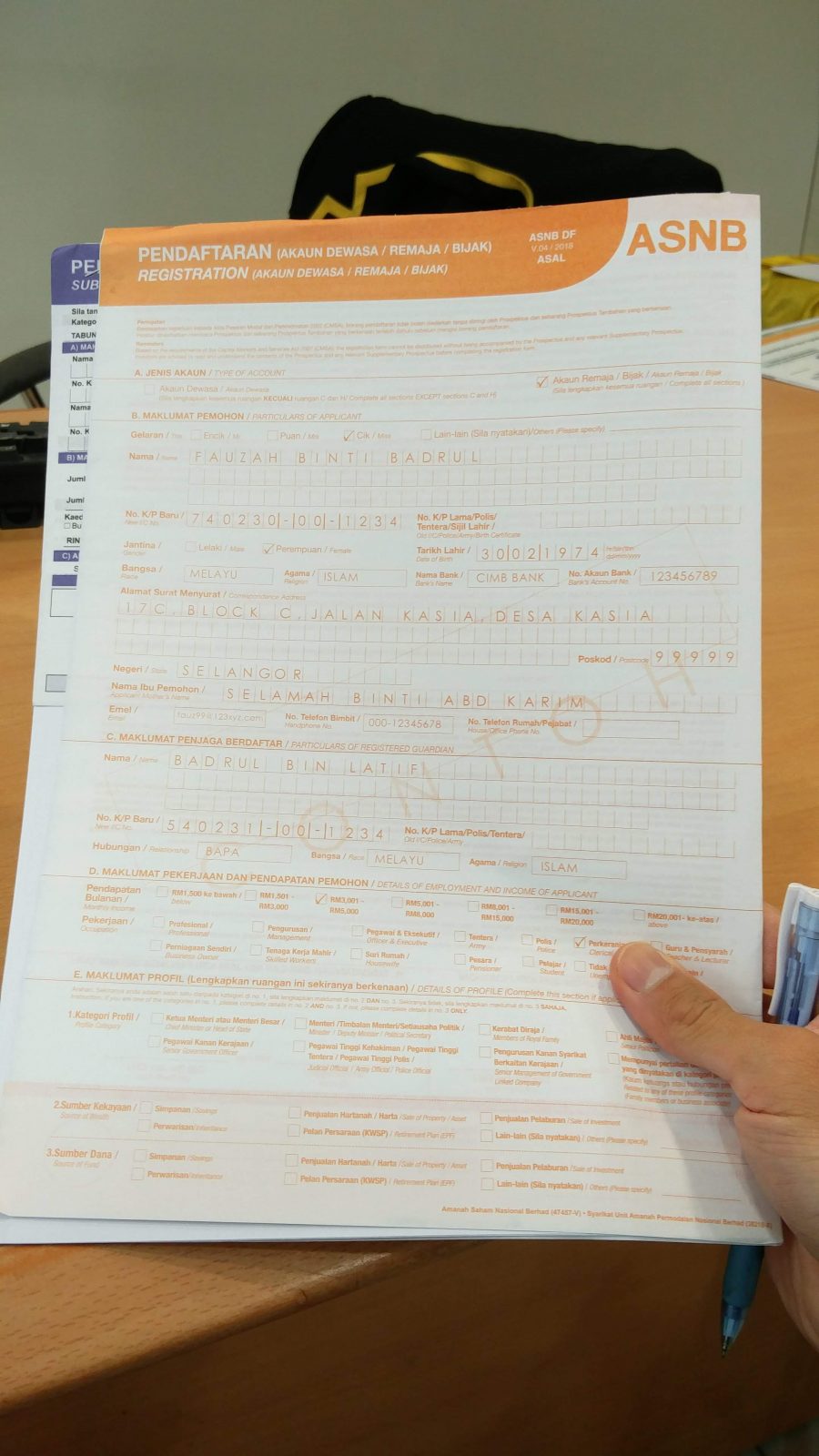
From my experience, the account opening process at the counter took quite a bit of time, due to some lengthy account activation procedures – so be sure to allocate about 40 minutes for everything! For my initial investment, I only managed to open my ASNB account (ASM 3 – 1 Malaysia) with RM10. As there were no extra units available (minimum RM100 additional investment), I could not buy more units :(
(2) Buying Additional Units & Managing Your Investments via myASNB Platform!
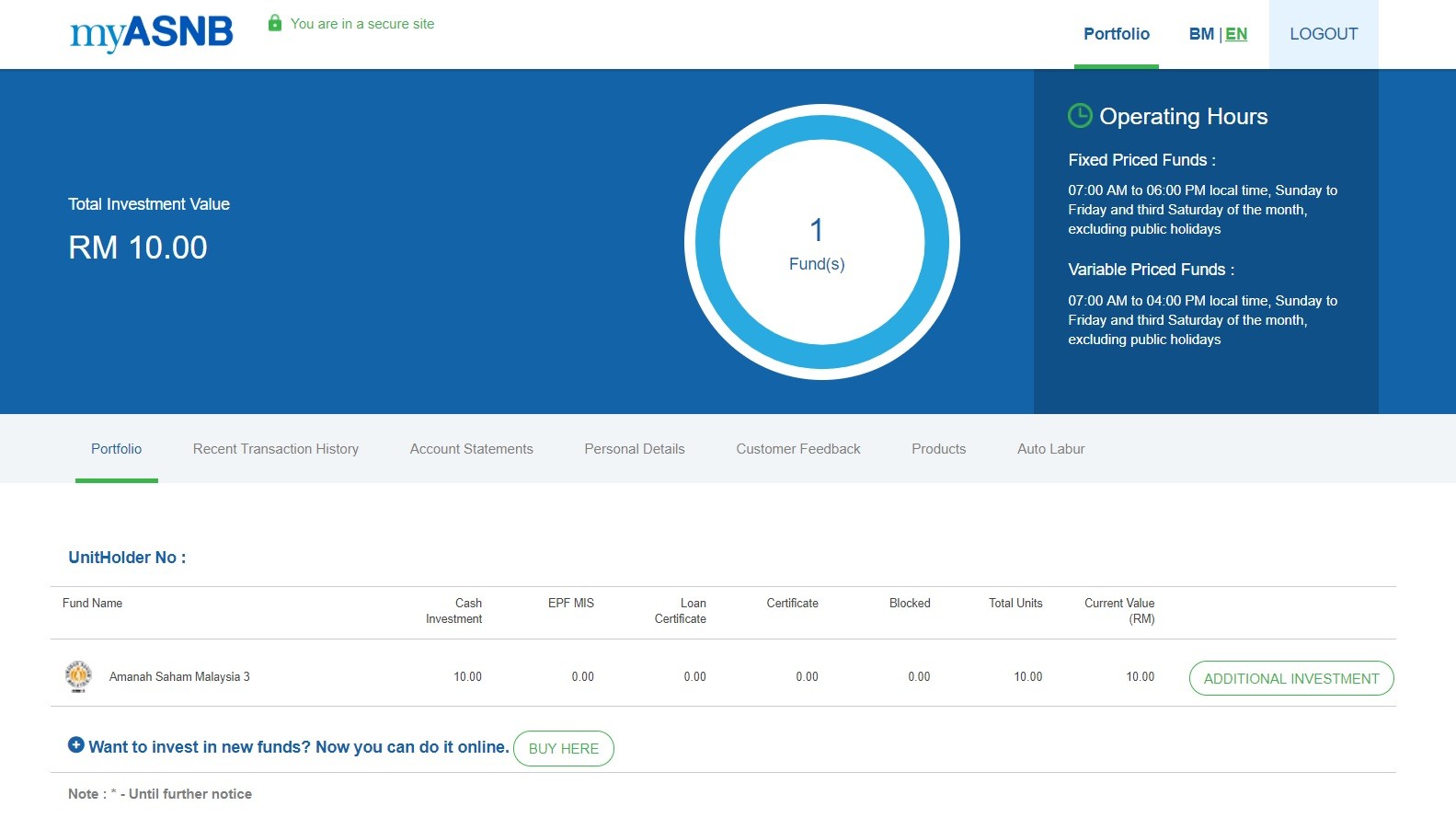
myASNB is a platform by ASNB where you can manage your portfolio and purchase additional units of the fund without going to the counter. Although I did not manage to buy additional units when I register for my ASNB account, I can still try to buy it via the myASNB platform and app.
As a whole, I like the interface of myASNB platform and its app as they provide a clear and simple overview of my portfolio and they are really easy to navigate around. As for unit purchase, Amanah Saham’s Fixed Price Funds are open to purchasing from 7 am to 6 pm, Sunday to Friday and the third Saturday of the month, excluding public holidays.
(3) Everything about Amanah Saham investment is great, but there is one BIG catch…
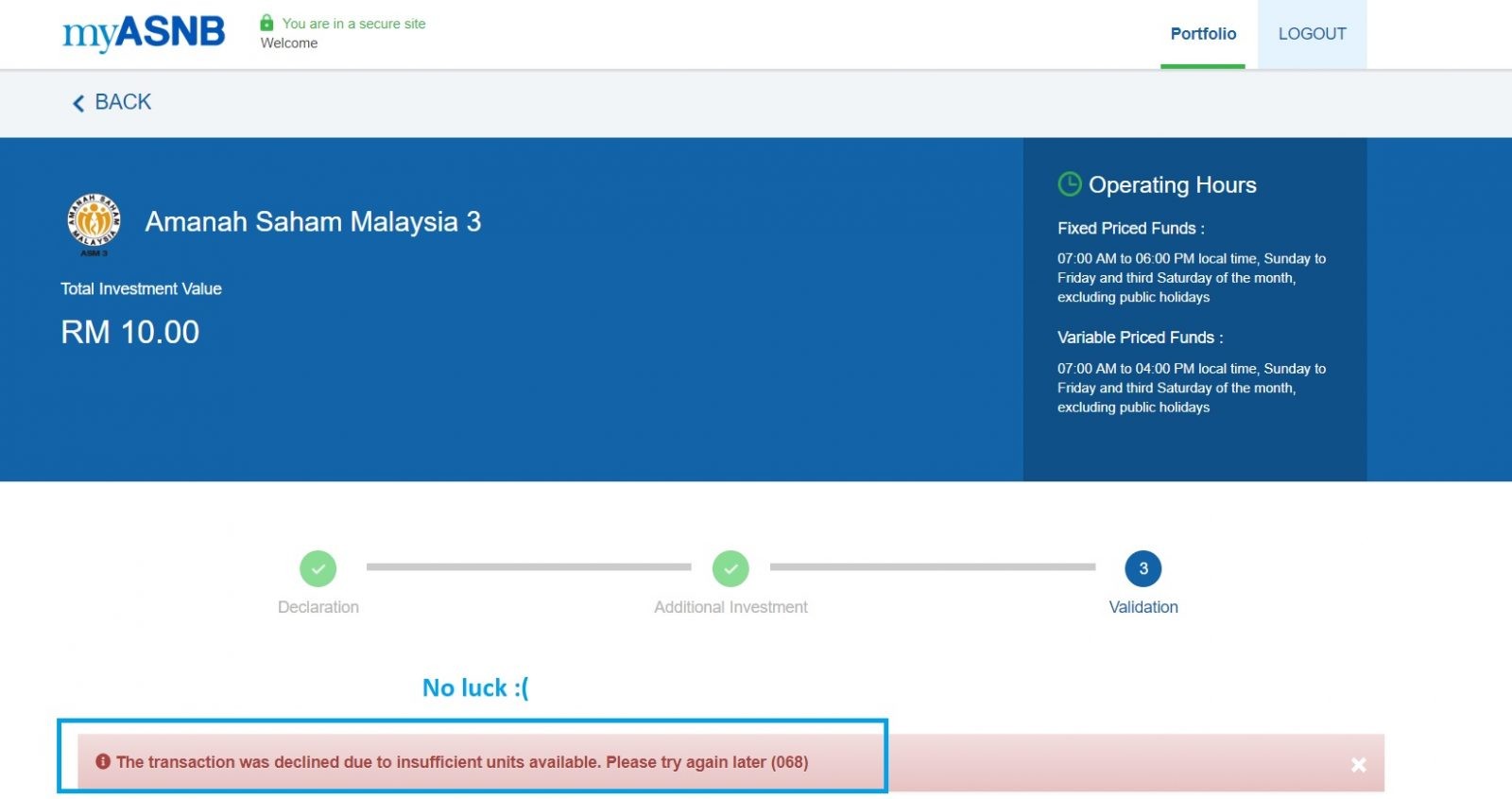
As you may have guessed it: Getting your hand onto any of the Fixed Price Fund is extremely hard. With a minimum RM100 investment, it is most of the time, a matter of luck whether you can buy any of the funds even though you have an account.
Well, since Amanah Saham Fixed Price Funds are almost too good to be true, it makes a lot of sense that people would not sell their units once they get their hand on the funds. As of the time of the release of this article, I have been trying to purchase additional units of Fixed Price Fund via the myASNB app with no avail.
No Money Lah’s Verdict: Amanah Saham Fixed Price Funds – a game of luck?
Essentially, I retain my view on Amanah Saham’s Fixed Price Funds: these funds are indeed a great deal and, without doubt, one of the best long-term investment options for Malaysians.
That said, considering how hard it is to purchase additional Fixed Price Funds at the moment, I think you would either need to have a lot of commitment to try buying everyday on myASNB, or you could go find some alternative investment vehicles available in the market.
In short, researching about Amanah Saham has been an eye-opening and informative experience for myself, as I get to learn so much about one of the best investment options in the country.
Check out Part 1 and Part 2 of my Amanah Saham articles if you haven’t read them!
p.s. If you face the same problem buying Amanah Saham’s Fixed Price Funds, why not consider other investment options that are available in the market?
Investing in the sector of Real Estate Investment Trusts (REITs) is definitely one of my favorite long-term investment choices in the stock market, as REITs also give out competitive dividends and return. More details HERE.
Disclaimer: The accuracy of this content is based on the best effort by myself and at the time of writing. I do not guarantee the validity of this content as details and performance of ASNB and its funds will change over time. This article is also not a buy/sell recommendation. Please seek professional financial planner’s advice on this matter.


Here's What to do if Your Credit or Debit Card is Compromised
What to do when you find out that your credit or debit card is compromised?
When your card is compromised, it could be one or a combination of the few reasons below:
- Your credit card or debit card is stolen/lost.
- Your PIN is compromised.
- Your card is used for online transaction which is not authorized by you.
- Your card's details are leaked by the platforms you linked your card to.
- And many more.
p
What to do when you learn that your card may have been compromised:
- Don’t panic. Call your bank’s 24-hour fraud line for help immediately (google for the number if you are unsure). In most cases, the operator will cancel/freeze your card to prevent anyone from using the card for transactions.
p
If no money is lost from this, then make a bank appointment for a new card. You may be charged a small fee for the new card. If money is lost in this incident, proceed with the next steps.
p - If money is lost: File a police report on this matter. Your bank will need the report for further documentation at Step 3.
p - Next, fill up a charge dispute form, which is usually available to be downloaded at your bank’s website. Then, submit the (1) completed form, (2) your police report, and (3) other available supporting proof/documents (eg. Receipts/statements/transaction slips).Remember to make a copy of your reports and documents to support your claims.
p - The whole dispute investigation can take up to 90 days*. Until then, the only thing to do is to be patient and wait.
*As per the details on HSBC’s Card Dispute Form.
p
Can you get your money back?
Perhaps the next question you have is:
Can I get my money back?
The short answer is: It depends. Let’s discuss further on this matter:
-
Your card is a Credit Card
If your compromised card is a credit card, chances are you’ll not be liable for the loss. Meaning, there is a decent probability that your bank will refund you for the money lost.
According to Bank Negara Malaysia (BNM)’s credit card guideline in 2019, credit card issuer cannot hold cardholder liable for unauthorized transactions, unless the issuer manages to prove that the cardholder has:
- Acted fraudulently;
- Delayed in notifying the issuer as soon as reasonably practicable after having discovered the loss or unauthorized use of the credit card;
- Poorly management of PIN or card
Note that I tweaked the sentences shorter. Please refer to Section 15 of the BNM guideline for an accurate representation. An example of HSBC’s credit card’s agreement below shows that credit card holders are indeed protected as per BNM’s guideline:
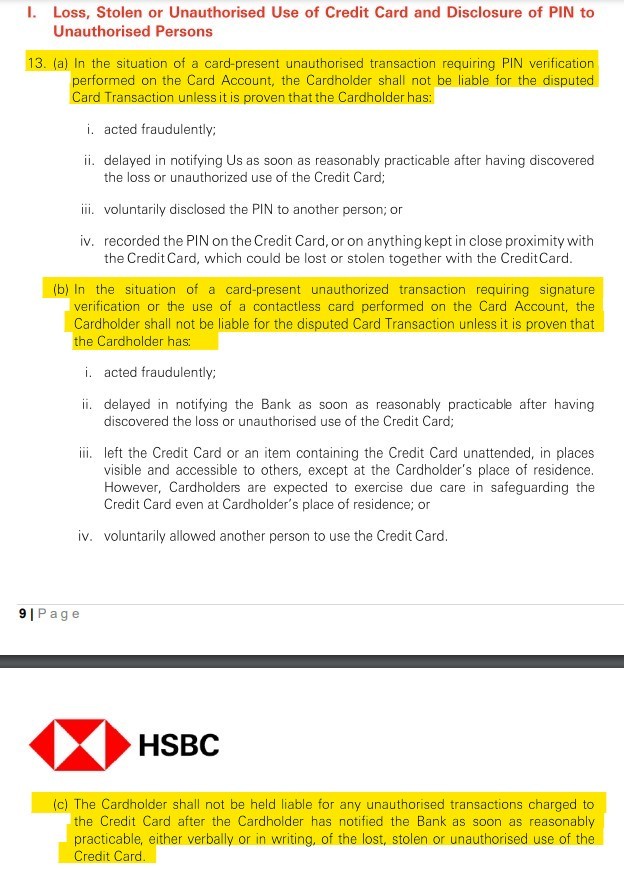
In addition, MasterCard, Visa, and AMEX have their own liability protection in place to protect cardholders from losses due to unauthorized transactions.
Simply put, if you report your lost/compromised credit card immediately, it is likely you are in a good position to reclaim your monetary losses.
p
-
Your card is a Debit Card
Now, if the lost/compromised card is a debit card, things are less likely to go in your favour.
Reason being, unlike credit cards, there is actually no exact ‘debit card guideline’ issued by BNM to protect debit card holders against frauds. Well, at least I couldn’t find it online.
Moreover, things are even less in the favour of debit card holders when we look into the fine print of the T&C of a debit card. As you can see below from CIMB’s debit card T&C, liabilities from loss of card or theft are fully the responsibility of the cardholder.
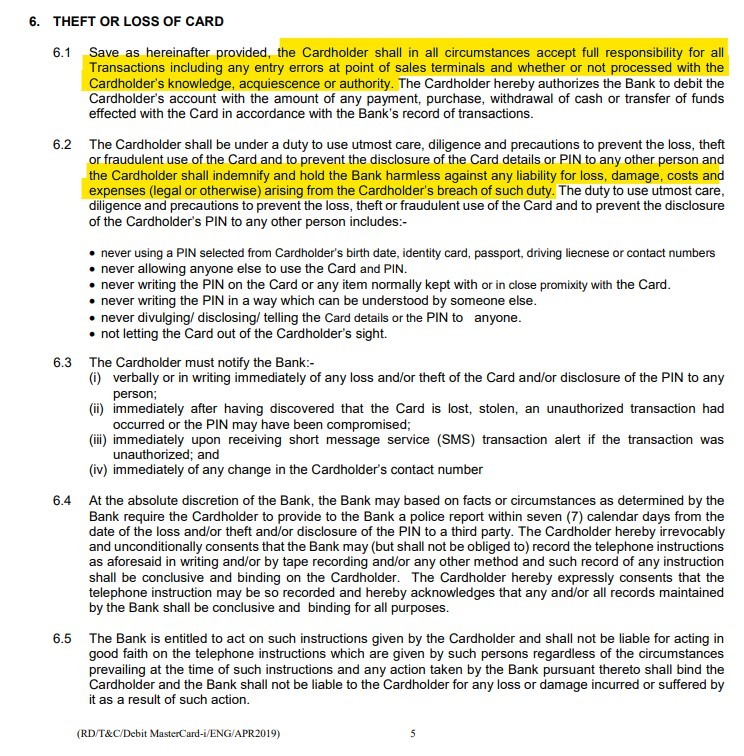
As such, debit card holders are almost at the mercy of banks in any claim disputes.
p
-
Whose money is lost? Yours, or the bank’s?
Next, a million-dollar question:
Why such a huge difference between credit cards versus debit cards when it comes to money lost from unauthorized transactions?
Reason being, when people fraudulently use your credit card, they’re spending the money of your credit card issuer. Until you pay your credit card due, the loss belongs to the credit card company.
However, when people fraudulently use your debit card, they’re spending money that you have in your bank account. Meaning, the money leaves your account instantly, regardless of the transaction is fraudulent or not.
As a result, this difference alone produces a huge disparity in how the losses are treated, and how fast your money can be retrieved.
For better understanding, I highly recommend you to watch this video featuring Frank Abagnale, which is a con-man turned US’s federal agent. He is now a consultant for financial and fraud consultancy firm. In this video, he explains why credit card is superior than debit cards in fraud protection.

p
Takeaways & How to Prevent Bank Card Frauds
There are many ways to prevent or avoid card fraud. Many of them are really common sense and you can find a good guide from Maybank here. Below, I list down some less talked about, but equally practical ideas:
-
Use Credit Card instead of Debit Card
While credit cards have always been linked with poor spending behavior and debts, it is extremely useful for people that practice financial discipline.
Using a credit card for online transactions allows you to gain legal fraud protection as outlined by the guideline from BNM.
In comparison, debit card does not enjoy such clear protection guideline from the authorities.
p
-
Use a Prepaid Card (eg. BigPay)
If getting a credit card is an issue (eg. Poor spending behaviour), then consider using a prepaid card instead.
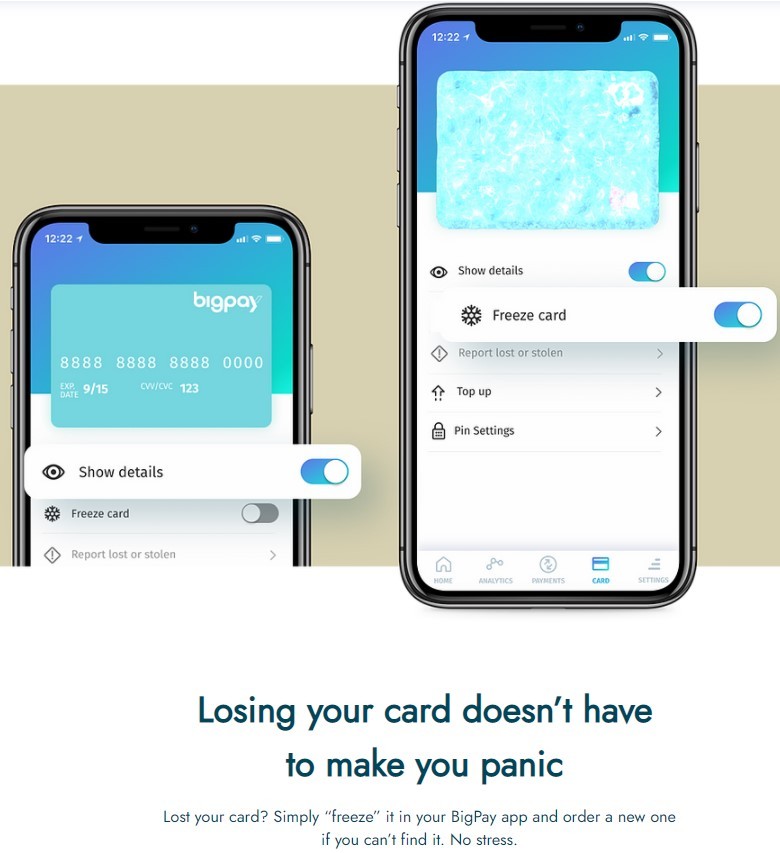
The good thing with prepaid cards like BigPay, is you can keep your card balance very small and only reload the card whenever you want to transact.
In addition, BigPay also comes with an app that allows you to freeze your card directly from the app. As such, this allows you to respond immediately after realizing that your card is missing or stolen.
Worse comes to worst, if your card is used for unauthorized transactions, the most you’d lose are the money you reloaded in your prepaid card.
p.s. Feel free to use my BigPay promo code: APKJOUSDBM when you open your BigPay account! Once you activated your card, both you and I will receive RM10 on our card respectively.
p
-
Avoid bringing Debit Card with you when you are out
If you have decided to not use a debit card, then stop bringing them with you when you are out.
This prevents the card to be stolen or missing, and falls into the hands of people with bad intentions.
p
-
Reduce transaction limit on your debit card
Lastly, if you really cannot leave the house without your debit card, at least limit how much can be transacted via your debit card.
As an example, CIMB debit cards have an RM10,000 daily transaction limit by default. It is wise to reduce the limit to minimize the impact of your losses in the unfortunate event of fraud.
p
My Personal Experience with Card Fraud
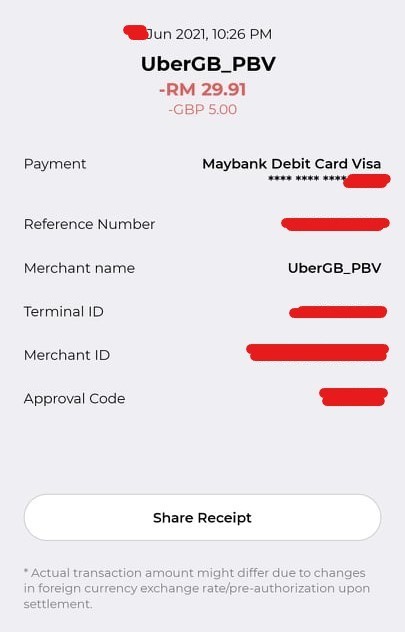
A few weeks ago, someone tried to use my card details to initiate a Uber transaction in the UK.
As a result, my card was compromised and I had to arrange with my bank to make a new card. Fortunately, no money was lost from this as the money was immediately re-credited into my account.
Nevertheless, this serves as a good reminder for us all to be very careful with the platforms/organization that we share our card details with. If you are to link your card with a platform/an app, avoid using your debit card and instead, use a credit card or prepaid card.
p
No Money Lah’s Verdict
So, there you have it – what you need to do in an event of your bank card being compromised.
If you were in an emergency situation and found this post, I hope this article is helpful to you! Fingers crossed your situation has been resolved and please take preventative measures mentioned in this article to protect yourself!
If you find my article helpful, there are a few ways you can do to support my blog:
- Please share this article with your friends and family so they are aware of what to do too if they ever face this situation.
p - Consider using my referral links for your personal finance/investment needs. This helps me big time in sustaining the blog!
p - Subscribe to my FREE email newsletter for weekly personal finance and investment content from me!
If you have any questions, feel free to leave your comment in the comment section below – I’ll do my best to help! 👇
What is Ripple (XRP) & Should You Invest in it?
Have you ever tried to send money overseas? If yes, you’d know that it was a slow and painfully expensive experience.
No more such headache, as Ripple aims to improve our existing financial system especially when it comes to global payments & transactions.
In this article, I want to explore Ripple and its cryptocurrency XRP – how exactly it could improve our current financial system, and what do you need to know before investing in it?
p
Highlights of Ripple (XRP):
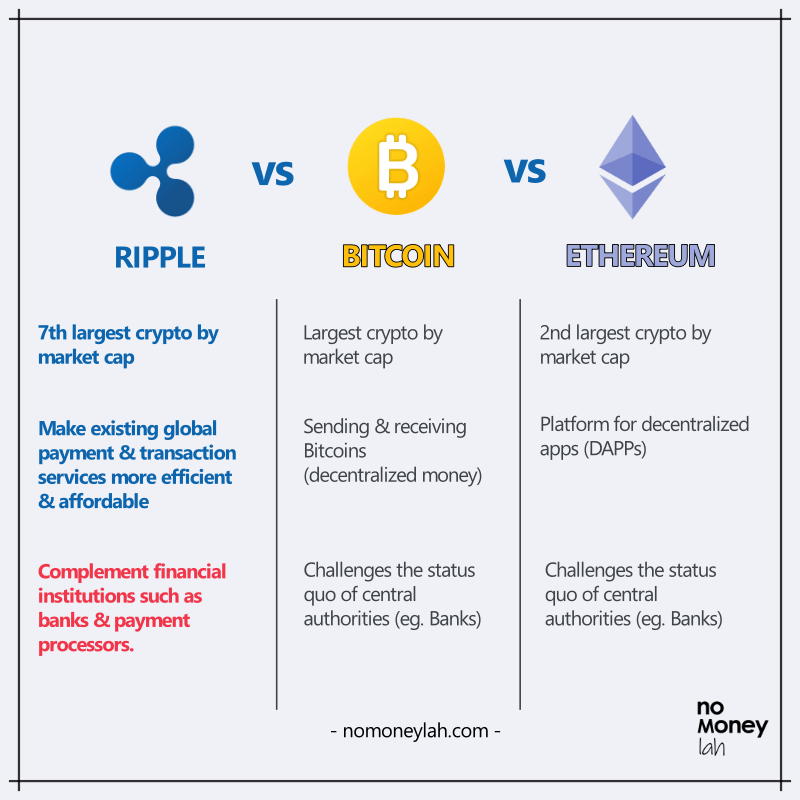
- Ripple was created in 2012 by Ripple Labs, a US-based tech company. XRP (crypto issued by Ripple Labs) is the 7th largest cryptocurrency by market cap, worth more than $41 billion in value.
p - Solid use case: Ripple aims to make existing global payment & transfer more efficient compared to intermediary solutions like Swift and Western Union. XRP is the cryptocurrency that involves in the transfer of money between different currencies across the Ripple Network.
p - Unlike Bitcoin and Ethereum that challenge the status quo of central authorities (eg. Banks), Ripple is created to serve the financial institutions by making the existing services better.
NOTE: Before you proceed, it is best that you have a basic understanding of Bitcoin and Ethereum first. This will make learning about Ripple much, much easier. Check out my post on Bitcoin HERE, and Ethereum's post HERE - both conveyed in simple-to-understand English.
p
International Money Transfer is, well... Sucks
Transferring money abroad using different currencies is slow and expensive.
As an example, let’s say you are sending RM1,000 in New Zealand Dollar (NZD) to your brother in New Zealand.
There are 3 issues with our existing banking solutions like Swift or Western Union:
- Expensive FX Spread: A conversion fee will incur due to the bid-ask spread between MYR and NZD. (Similar to the experience when we exchange for foreign currencies at money-changers)
p - Inefficient system: Behind the scene, NZD may not be a currency that most banks keep in their reserves. Since USD is a commonly used currency globally, banks would normally convert your MYR to USD, which will need to be converted back into NZD prior to reaching your brother’s bank account.
p - Expensive Intermediary Bank Fees: One issue with our banking system is most banks do not have a direct line with each other. Hence, in order to transfer money from one bank to another, it’ll have to go through several intermediary banks searching for common network connection in order to clear a path for the transfer (think of transitional flight to countries like the US).
p
As such, expensive intermediary banking fees will incur.
As a result, by the time your RM1,000 (denominated in NZD) reaches your brother, it may be (much) less than RM1,000 in value due to all the fees. Worse, he may need to wait several days before he receives the transfer.

This is where Ripple comes in. Ripple aims to decentralize our current global payment system and make it more efficient and affordable.
p
How exactly does Ripple work?
Ripple works through a consensus protocol that contains a network of validators. Validators are a network of computers across the globe that facilitate transactions and maintains an ownership record of who owns what. Anyone can run a validator but Ripple also offers a default list of trusted validators.
The way a transaction in the Ripple network works is any transaction must have more than 80% approval (>80%) from the validators in order to go through.
p
What you need to know about XRP
Alright, so where does the XRP cryptocurrency come into the picture?
XRP is a cryptocurrency issued by Ripple. It is a cryptocurrency that involves in the transfer of money between different currencies across the Ripple Network. In short, XRP is what we are going to invest in when someone says he/she is investing in Ripple.
So, let’s go back to our example where your bank would like to move your RM1,000 (in NZD) to your brother in New Zealand:
Instead of going through complicated banking network, banks can instead become a ‘Gateway’, and conduct the transfer in XRP via the Ripple Network.
In this case, XRP is sort of like the ‘Joker’ card in card games: not the scary character, but the card that can be any other card. Meaning, if you want to exchange RM to NZD, it can be RM with RM and NZD with NZD.
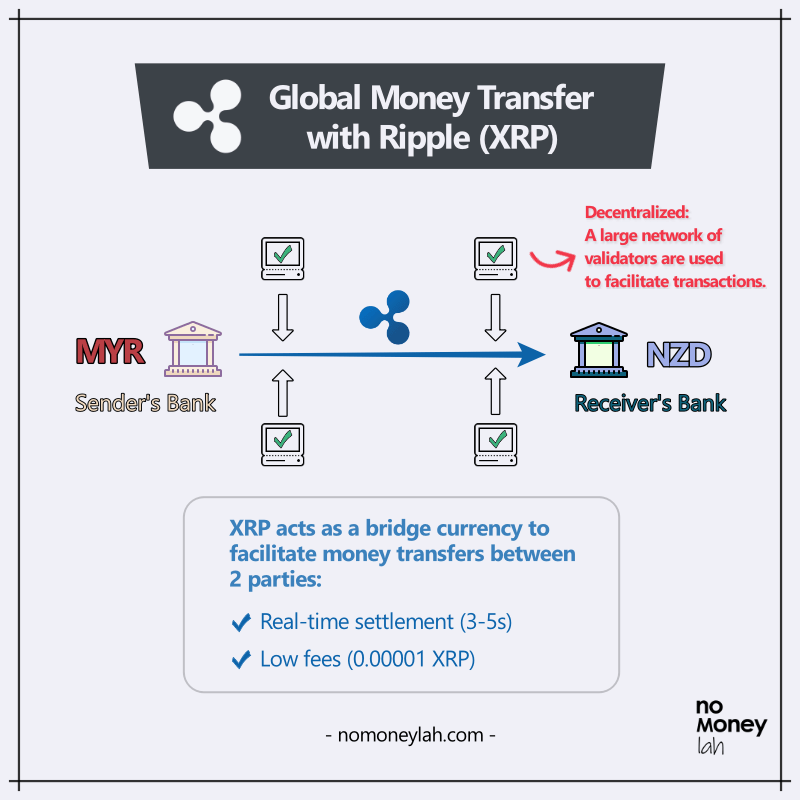
As a result, XRP transactions on the Ripple Network are able to achieve 3 significant benefits:
- Real-time settlement: XRP are able to settle transactions between 3-5 seconds instead of 3-5 business days.
p - Efficient: XRP is able to do about 1,500 transactions/second with the potential to match Visa’s capability of 65,000/s. In comparison, this is much more effective than Ethereum (~20/s) and Bitcoin (4-5/s).
p - Low fees: The transaction cost on Ripple is 0.00001 XRP, which is around 0.85 USD at the time of writing. This is much lower compared to conventional international transfer solutions.
p
How is XRP different from Bitcoin?
Firstly, the main role of Ripple (and its cryptocurrency XRP) is to complement existing financial institutions such as banks and payment processors. This is done by decentralizing payment solutions and making them more efficient. On the other hand, Bitcoin focuses on overhauling traditional fiat money, and as a result, removing central authorities altogether from the picture.
In addition, unlike Bitcoin, XRP coins cannot be mined. Meaning, unlike the miners in the Bitcoin network, the validators on the Ripple Network will not be rewarded when validating a transaction. This is because XRP runs on a very different consensus mechanism compared to Bitcoin (p.s. complex topic – you can read about them HERE if you are interested).
From these, XRP actually does not compete with Bitcoin or ETH (at least not directly). Instead, it competes with existing payment and remittance solutions like Swift or Western Union, and newer technologies like Wise.
p
4 things you need to consider BEFORE investing in XRP
#1 Is XRP centralized?
Whether Ripple is actually centralized in nature has long been a topic of debate. To understand this, you need to know the distribution of the XRP coins:
At the very start, a total of 100 billion XRP coins were created (or pre-mined) by Ripple Labs and no additional coins can be created anymore. Initially, 80 billion XRP went to Ripple Labs and 20 billion XRP were distributed among the founders. Over time, the 80 billion XRP that Ripple Labs own is slowly being released to the public.
As of June 2021, about 46 billion XRP is in public circulation. That said, it is obvious that most XRPs are still under the control of Ripple Labs.
With this in mind, Ripple Labs, without doubt, has heavy influence over the Ripple Network and XRP. When there is a figure/organization that has implicit influence over the system, it is up to investors to decide how ‘decentralize’ XRP is over the likes of Bitcoin and Ethereum.
p
#2 XRP vs SEC Lawsuit
Since late 2020, Ripple has been fighting a lawsuit with the US’s Securities & Exchange Commission (SEC). Reason being, SEC alleged that XRP is actually not a currency and instead, a security like stocks. In essence, the SEC wants to have jurisdiction over XRP due to the nature of how XRP works.
As a result, XRP has since been delisted from major crypto exchanges such as Coinbase. The lawsuit is still going on as of the time of writing but there are signs that Ripple may be winning the case (though we can never tell the absolute outcome).
If you are interested, you can read more about the lawsuit HERE.
With that said, Ripple’s lawsuit with SEC is certainly something that you need to take into consideration before investing. This could either be a main determent, OR a huge opportunity to invest in XRP.
p
#3 XRP is Volatile
The crypto world has never been shy of volatility and XRP is no exception for that.
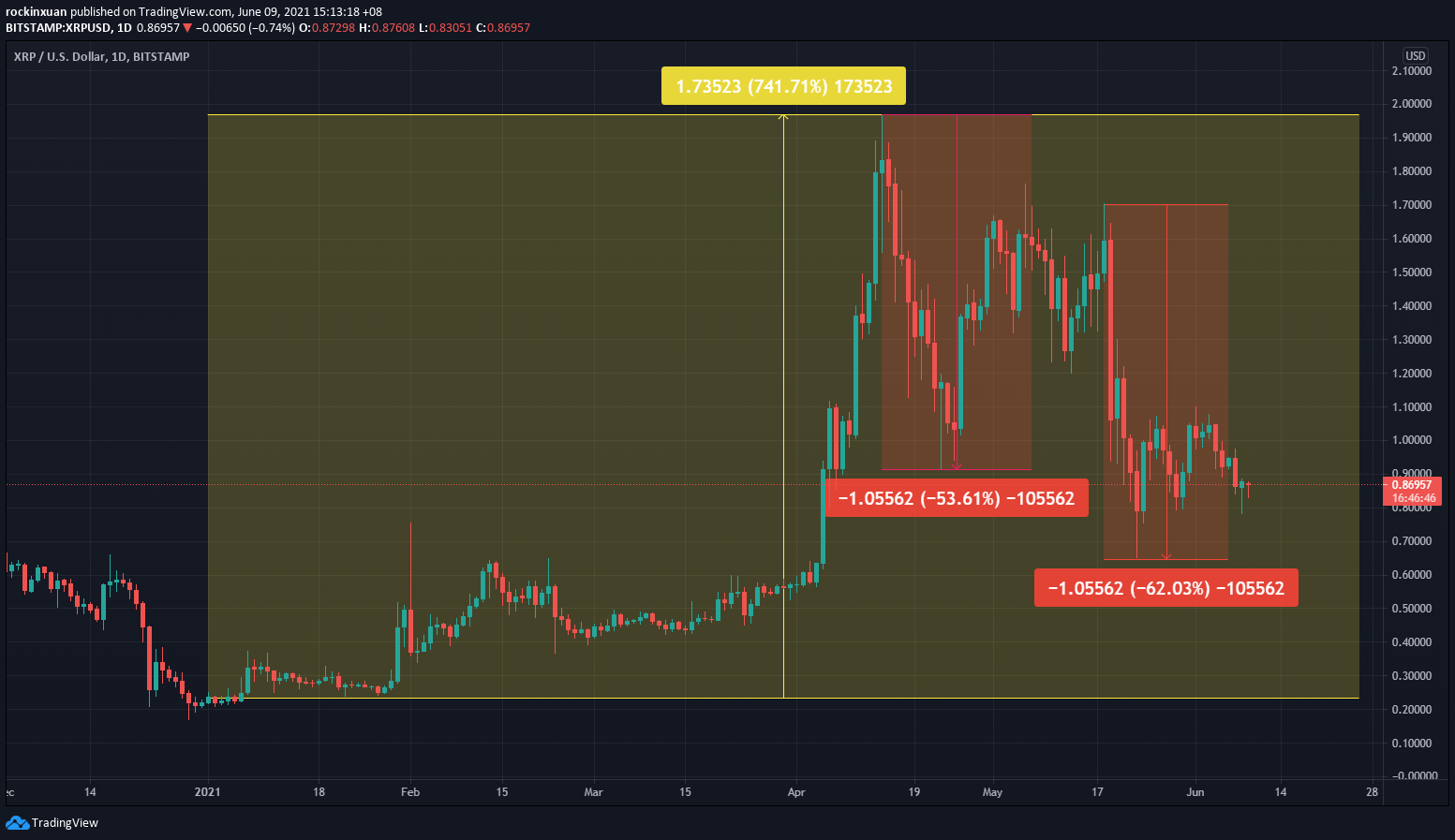
In fact, due to the existing lawsuit with SEC, XRP’s price has been very volatile in 2021. From a >700% increase to 2021’s peak, to 2 major huge selldowns (> -50%) so far, you truly need to understand your risk appetite before investing in XRP.
p
#4 Ripple’s Adoption
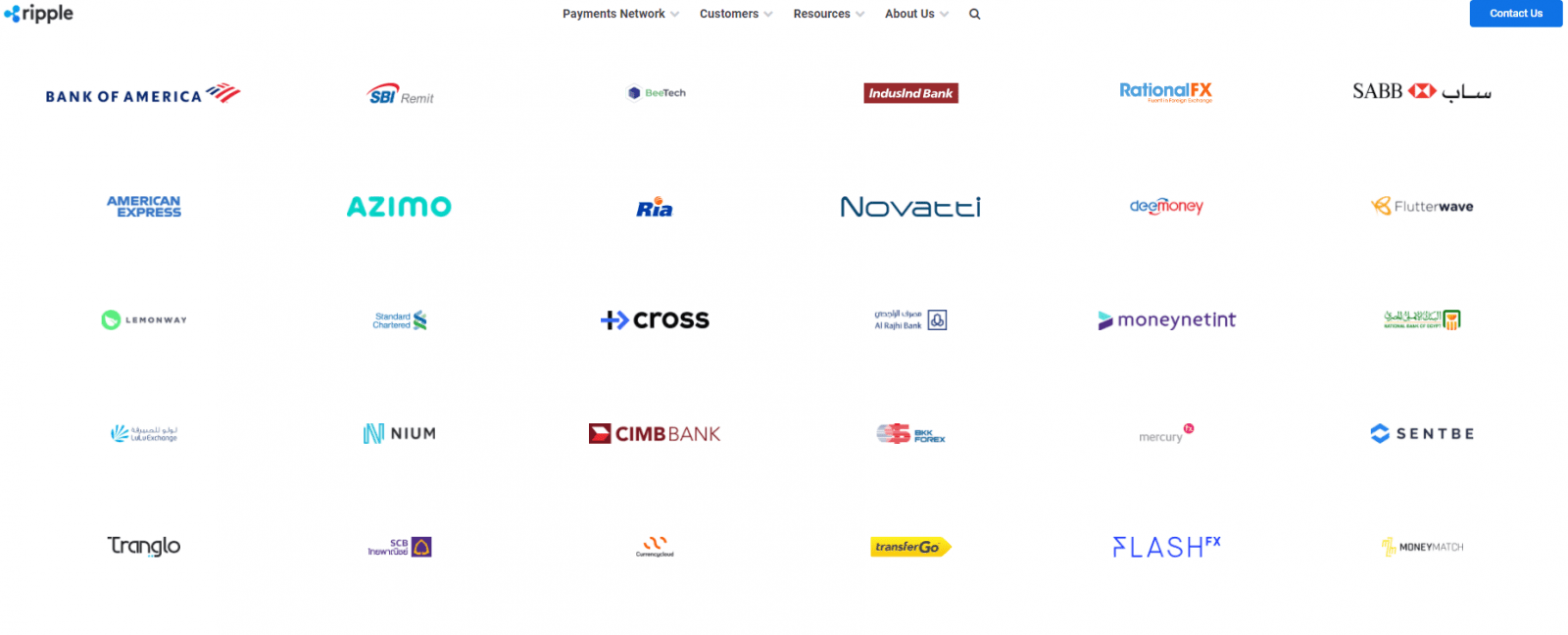
A glance over Ripple’s website, you’ll be able to see a list of Ripple’s customers with the likes of Bank of America, American Express, and CIMB Bank.
You can also check out many case studies that Ripple has over its website HERE. One notable company working with Ripple is MoneyMatch, which provide SMEs & individuals in Malaysia an alternative to the high transfer fees and FX rates compared to conventional banking solution.
p
My Personal Thoughts + Should You invest in XRP?
In my opinion, what Ripple can offer is truly unique among the crypto world. Instead of challenging the status quo of central authorities (eg. Banks) like Bitcoin and Ethereum, Ripple looks to serve financial institutions by integrating & improving the existing financial solutions.
As such, despite the current lawsuit with SEC right now, I do think Ripple has the most solid use case RELATIVE to our current financial system when compared to many other cryptocurrencies out there.
That said, we can never tell with certainty if our ‘current’ financial system will still be relevant in the far future. With that, if you are keen to invest in XRP, you should answer these 3 questions:
- Do you believe that Ripple will improve our financial system for the better?
- Are you confident that, with time, more and more financial institutions are going to adopt Ripple?
- Are you comfortable with short-term volatile swings?
p
How to invest in XRP in Malaysia?
The next question: How can you invest in XRP and cryptocurrencies in Malaysia?
Presently, there are 3 cryptocurrency exchanges that are approved by Securities Commission (SC) to operate digital asset exchanges. This means that these are 3 regulated exchanges where Malaysians can buy and trade Ripple and other cryptocurrencies.
Personally, I have been using Luno, the largest of the 3 regulated exchanges since 2017 and I am more than happy to recommend Luno for investors looking to invest in cryptocurrencies safely.
I will work on a dedicated Luno review soon, but here’s a brief rundown of its features:
- Multiple Offerings: The biggest SC-regulated cryptocurrency exchange which offers Bitcoin, Ethereum, Litecoin, Bitcoin Cash, and Ripple.
p - High Security: The majority of Luno’s customers’ cryptos are stored in a Deep Freeze storage – ie. A multi-signature wallet system, with private keys stored in different bank vaults. This means that no single person ever has access to more than one key, which translates to a high level of security of users’ cryptocurrency holdings.
p - Simple, user-friendly interface: Luno’s interface is exceptionally intuitive and simple to use. Every button and main functions are readily reachable and transacting ETH is straightforward.
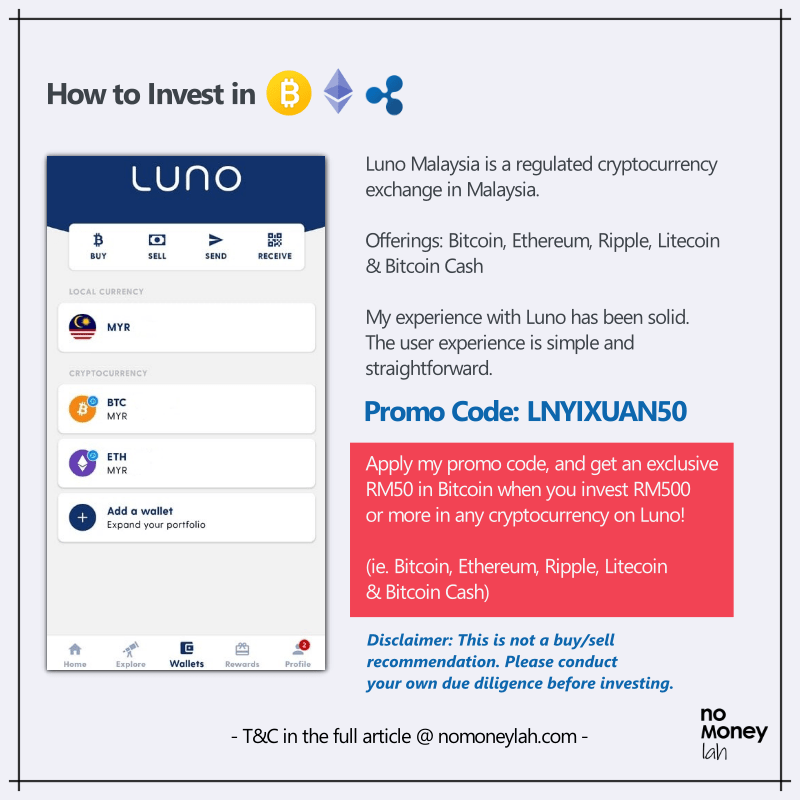
p - PROMOTION: No Money Lah is now collaborating with Luno Malaysia to bring the best-in-town deal for new Luno users that are keen to invest in cryptocurrencies! Use my dedicated promo code – LNYIXUAN50, and you will get RM50 worth of Bitcoin when you invest RM500 or more in any cryptocurrencies (Bitcoin/Ethereum/Litecoin/Ripple/Bitcoin Cash). That’s an instant 10% return on your investment.
The full details of this promo can be accessed HERE. Please go through them so you are clear that you meet the criteria for this RM50 promo.
p
No Money Lah’s Verdict
So here you have it – Ripple explained in simple English for beginners! I hope you find this article simple to understand and insightful!
Ripple is such a unique crypto compared to Bitcoin and Ethereum and I have a great time working on this article. Do share this post with your friends if you find it useful – I’d really appreciate it!
So, now’s your turn:
What do you think about Ripple? Are you planning to invest in XRP? If yes, why? If no, why? Let me know your thoughts at the comment section below!
Looking forward to hear from you soon!
Luno Promo Code: LNYIXUAN50
In collaboration with Luno Malaysia, No Money Lah is bringing the best-in-town deal for new Luno users that are keen to invest in cryptocurrencies!
Use my dedicated promo code – LNYIXUAN50, and you will get RM50 worth of Bitcoin when you invest RM500 or more in any cryptocurrencies (Bitcoin, Ethereum, Litecoin, Bitcoin Cash, and Ripple). That’s an instant 10% return on your investment.
The full details of this promo can be accessed HERE. Please go through them so you are clear that you meet the criteria for this RM50 promo.
Open Your Luno Account HERE.
Disclaimer: This article produced purely for sharing purposes and should not be taken as a buy/sell recommendation. Information in this article is accurate as of the time of production. Please consult a licensed financial planner before making any investment decisions.
Guide: Covid-19 Insurance Coverage in Malaysia
Are you covered by your insurance company if you or your loved ones are infected with Covid-19?
With the pandemic hitting Malaysia harder than ever this year, our public healthcare system is under intense pressure. Packed quarantine centers, hospital rooms, and ICU are stressful to both the patients and front-liners. Treatment at private hospitals ain't cheap either, ranging from RM10,000 to RM30,000 (or more).
Let's be honest, it is painful and expensive to be infected by Covid-19 today.
Ironically, most people barely have any idea about their insurance coverage on Covid-19. Afterall, you are paying for your insurance every month so it should be paying for all your Covid-19 treatments...right?
Except it isn't that straightforward - as you'll learn about the nuances as you go through my article.
I planned for this article with the idea to compile the details of Covid-19 coverages from major insurance companies in Malaysia: AIA, Great Eastern, Allianz, Prudential, Manulife, Etiqa, and Hong Leong Assurance (HLA). The process was painfully tough as each insurance company has different coverage and terms - but I finally did it.
In this comprehensive Covid-19 insurance guide, let’s address the important questions that we have on Covid-19 insurance coverage:
- Do insurance companies offer any free Covid-19 coverage to policyholders? If yes, what are they?
- Are you covered from vaccines' side effects?
- Does your medical card pay for Covid-19 hospital treatment, especially private hospitals? (READ THIS!)
- How to claim the fees for your Covid-19 test?
- What to do if you do not have enough Covid-19 coverage? (Free and paid options)
- What can the insurance industry do better for customers during the pandemic?
p
FREE Covid-19 additional coverage by insurance companies
Due to the pandemic, insurance companies in Malaysia have introduced various Covid-19 protection to policyholders. As of the time of writing, these protections are complimentary to policyholders with no additional cost.
In short, most insurance companies offer respectable complimentary protection. However, I think these protections should be automatically available for existing policyholders without extra registration needed (ahem...Great Eastern and Allianz).
p.s. Best viewed on desktop
p
| Home Quarantine* | Quarantine @ Quarantine Centres* | Hospitalization* | Death | Eligibility | Extra Registration Needed? | Waiting Period to be eligible for claim | Deadline | Special Note | How to claim | |
|---|---|---|---|---|---|---|---|---|---|---|
| AIA | RM1,000 | RM1,000 | RM1,000 | RM5,000 for new clients/RM10,000 for existing clients. | New and existing clients with individual Life Insurance and/or Flex PA, or participate in a new individual Family Takaful plan. | No | Yes, 14 days after the new policy/certificate has been activated. | Updated 5/8/2021: 31/12/2021 or upon reaching the claim limit of RM3M, whichever is earlier. | New client = activated from 1/6/2021 to 31/8/2021. Online insurance and takaful plans are excluded. | Refer to Agent/Financial Planner for more info |
| Great Eastern | NA | NA | RM50/day | NA | For life assured with primary medical plan with exclusion clause on communicable diseases requiring quarantine by law | Not needed for eligible policyholders registered on e-connect | 14 days | Until payout of fund is reached | Not publicly stated on website | Refer to Agent/Financial Planner for more info |
| Allianz | NA | NA | NA | RM20,000 | Individual policyholders who purchased any personal insurance products of the Allianz Life or Allianz General issued from 1/7/2021 - 31/8/2021 | Yes | 14 days | Until 31/12/2021; OR until RM1M payout is reached | https://www.allianz.com.my/we-care-deathbenefitclaim | |
| Prudential | NA | NA | Refer to Hospitalization section for more info | NA | NA | NA | NA | NA | NA | NA |
| Manulife | RM200/day up to 30 days | RM200/day up to 30 days | RM200/day up to 30 days | RM10,000 Additional RM5,000 if the individual is a Medical Staff who works in a registered hospital in Malaysia or MOH designated screening facilities involved in the handling of COVID-19 cases in Malaysia. | A policyholder of Manulife, where the policy must be issued prior to or within the programme period | No | For policies issued/reinstated on or after 26/2/2020, Hospitalization Income Support will not be payable if the customer diagnosis of COVID-19 occurs within 14 days from the date of the policy issuance/reinstatement. | 30/6/2021, or until RM 1M payout is reached, whichever earlier [Update 16/6/2021: Fully Redeemed] | (1) not applicable to insured who is covered under any complimentary group policies offered by Manulife. | Refer to Agent/Financial Planner for more info |
| Etiqa | RM5,000 Cash Relief upon diagnosis of Covid-19 | (1) An individual customer of Etiqa Life Insurance Berhad or Etiqa Family Takaful Berhad. (2) Your plan must be in-force, active and non-delinquent (i.e. no outstanding premiums/contributions that are unpaid) at the point of diagnosis and claim submission. (3) You did not receive the RM5000 Cash Relief payout in 2020. | No | Unclear | 31/3/2021 | Group customers are excluded | www.eti.qa/livechat or email at [email protected] | |||
| Hong Leong Assurance | NA | NA | 1. RM200/day for up to 5 days 2. Medical Bill Reimbursement for private hospitals (referred by MOH): i. Cat 3: up to RM5,000 per life ii. Cat 4: up to RM15,000 per life iii. Cat 5: up to RM25,000 per life | RM10,000 | For HLA policyholders with an individual medical policy | No | No | Updated 5/8/2021: 16/7/2021 - 31/12/2021, or until payout of RM1M is reached. | Refer to Agent/Financial Planner for more info |
(1) This info is accurate as of 7/8/2021. Click on the name of each insurance company for more info.
(2) These coverages are complimentary to policyholders. As per my understanding, they do not impact the terms and payout of your existing policies.
(3) Need more info? Reach out to my financial planner for a free financial consultation session, or a list of reliable full-time agents from each insurance company at the end of this article!
(4) Insurance companies/representatives with the most updated info feel free to reach out to me at [email protected]
*Under the order from Ministry of Health/At MOH Designated Quarantine Centres or Hospitals
p
Vaccines’ Side Effects: Are they covered by your insurance company?
While the risk is minimal, some people may still experience side effects after getting their Covid-19 vaccination.
The question is, will your insurance company cover the fees if you or your loved ones require medical treatment due to the side effects of vaccines?
p.s. Best viewed on desktop
p
| Yes/NA | Death | Eligibility | Deadline | |
|---|---|---|---|---|
| AIA | Yes, RM100 daily up to 14 days due to hospitalization from vaccine side effects. | RM20,000 if death occurs within 30 days from vaccination date | All Malaysians aged 18 - 70 that signed up through AIA's microsite. | 31/12/2021, or until the total payout of RM3M, whichever is earlier. |
| Great Eastern | Yes, RM 200/day up to a maximum of 7 days for hospitalisation, due to adverse events following immunization (AEFI) within 14 days after receiving a COVID-19 Vaccine. | A lump sum of RM10,000 per life if death is related to AEFI within 30 days from receiving a COVID-19 Vaccine or from date of admission to hospital due to AEFI, whichever is later. | All life assured of Great Eastern Life who is a registered e-Connect user and whose policy is in-force during the Coverage Period (except for compulsory Group Employee Benefits and policies with coverage term of less than 1 year). | 25/2/2021 - 31/12/2021, or until the total payout of RM1M, whichever is earlier. |
| Allianz | Yes | Allianz medical plan cutomers. | Unclear | |
| Prudential | Yes, RM500 for hospitalization due to adverse effects from immunisation (AEFI) within 7 days after an approved COVID-19 vaccination | All Prudential Malaysia customers. | 8/2/2021 - 31/12/2021, or upon reaching payout of RM1M, whichever is earlier | |
| Manulife | Yes, serious adverse effect within 14 days after receiving an approved COVID-19 Vaccine, capped at maximum limit of RM5,000 per life. | Person covered under the medical plan offered by Manulife that does not cover post COVID-19 vaccination, i.e. medical plans that carry an exclusion which excludes any cost of hospitalisation due to preventive treatment/preventive medicines. | 24/5/2021 - 30/9/2021, or upon reaching payout of RM500k, whichever is earlier | |
| Etiqa | Yes | Included in all medical plans that cover hospital admissions | Unclear | |
| Hong Leong Assurance (HLA) | Yes, RM200/day up to 7 days | RM10,000 | Life assured of individual policy with medical coverage | 16/7/2021 - 31/12/2021, or upon reaching payout of RM1M, whichever is earlier |
(1) This info is accurate as of 5/8/2021. Click on the name of each insurance company for more info.
(2) Need more info? Reach out to my financial planner for a free financial consultation session, or a list of reliable full-time agents from each insurance company at the end of this article!
(3) Insurance companies/representatives with the most updated info feel free to reach out to me at [email protected]
(4) By the way, here's the meaning of different categories of Covid-19:
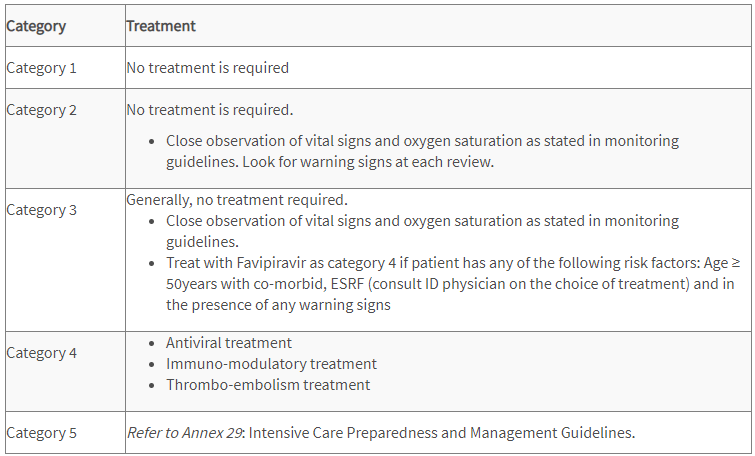
p
Hospitalization: Does your medical card pays for your Covid-19 treatment – especially at private hospitals?
With Covid-19 putting a heavy burden on our public healthcare system, many would choose to go for treatment in private hospitals – especially when there is no time to waste.
However, treatment in private hospitals is expensive, ranging from RM10,000 to RM30,000 (or more).
The question is, does your medical card covers your hospitalization treatment?
MUST-KNOW Side Info: Covid-19 & Medical Card
Did you know that most of the medical cards in the market today do not cover for communicable diseases/general pandemics like Covid-19?
It is likely in your medical card, there is a clause called ‘general pandemic exclusion’ (or wordings of similar meaning). Hence, insurance companies generally DO NOT cover your Covid-19 hospitalization treatment if your medical card holds such restriction.
As you'll see in the table below, only AIA, Etiqa (for a limited time), and Prudential medical cards pay for your hospitalization treatment as per your medical card coverage. Other companies only offer protection on a goodwill basis (ie. very limited coverage with restrictions).
Of all, I’d say AIA and Prudential’s medical card is the most valuable medical card you can have right now. Whether you are an existing AIA or Prudential medical card holder, or you simply want to find out more, feel free to reach out to my recommended full-time AIA and Prudential agent for inquiry, contact HERE.
In contrast, if you are holding medical cards from other companies, it is best for you to seek additional hospitalization coverage for Covid-19 (eg. check out Etiqa e-Medical Pass below).
p.s. Best viewed on desktop
p
| Medical plan(s) with exclusion on communicable disease/general pandemic | Medical plan(s) without exclusion | Eligibility | Waiting Period? | Deadline | Special Note | How to register/claim | |||
|---|---|---|---|---|---|---|---|---|---|
| AIA | AIA Medical Plans pay for hospitalization. AIA Critical Illness Plans pay for your chosen sum covered if you are admitted to ICU due to Covid-19 | Need to be referred to private hospital by Ministry of Health (MOH) | Refer to agent/financial planner for more info | NA | Medical Plans: A-Plus Health A-Plus Total Health A-Plus Health Booster A-Life MedRegular A-Life Medik Famili A-Plus Health Guard Critical Illness Plans: A-Life Beyond Critical Care A-Plus Beyond Critical Shield | Pay first claim later. Refer to agent/financial planner for more info. | |||
| Great Eastern | i. Up to RM5,000 for Category 3 COVID-19 patient, or ii. Up to RM15,000 for Category 4 COVID-19 patient, or iii. Up to RM25,000 for Category 5 COVID-19 patient. | All life assured of Great Eastern Life who are registered e-Connect users and have any in-force primary medical plan(s) with exclusion on communicable disease requiring quarantine by law (except for compulsory Group Employee Benefits). | A waiting period of 30 days applies from the risk commencement date of new business policies or reinstatement date, whichever is later of the policy. | 27/3/2021 - 30/9/2021, or upon reaching maximum claims limit of RM1 million, whichever is earlier. | (1) Private hospital only. (2) The estimated timeframe to process a claim is within 10 to 20 working days upon receiving complete claim documents. | Pay first claim later. Refer to agent/financial planner for more info. | |||
| Allianz | RM6,000 (RM3,000 for self and additional RM3,000 for spouse/children) | Applicable to the eligible Allianz Life customers who registered for MyAllianz customer portal | 14 days after the Eligible Participant's Campaign registration date | 30/6/2021, or upon reaching payout of RM3 million, whichever earlier. | No medical plan needed to be eligible. You are qualified for this as long as you are an eligible Allianz Life customer. | Register at www.allianz.com.my/we-care#register | |||
| Prudential | Prudential reimburses charges incurred for medically necessary treatments when customer undergoes hospitalisation due to COVID-19 | Medical Plan issued by Prudential: PRUHealth PRUMedic Essential PRUFlexi Med PRUValue Med PRUMillion Med Medical Plan issued by Prudential Takaful: Takaful Health Takaful Health2 HealthEnrich HealthEnrich+ Medic Protector Health Protector Medic Essential | 30 days waiting period upon the commencement of the medical plan | 6/8/2021 onwards until announcement of end of coverage | Claims must be submitted within 3 months from the hospitalisation date. | Claim documents must be submitted via PRUServe Plus or cvia email at [email protected] or [email protected]. | |||
| Manulife | 30-Day waiting period waived for all medical plans | Individual who is covered under a medical plan with Manulife. | None | 24/5/2021 - 30/9/2021, or upon reaching payout of RM500k, whichever earlier. | Government hospitals designated by Ministry of Health ONLY! | Refer to customer service [email protected] | |||
| Etiqa | The coverage amount follows your current terms of your plan. | An individual customer of Etiqa Life Insurance Berhad or Etiqa Family Takaful Berhad. You must have a medical plan with Etiqa. | Waiting period applies | 31/12/2021 | Application to both Private & Government hospitals. This benefit to cover Covid-19 will utilize the allocations of your existing Etiqa plan. | Pay first claim later. submit a reimbursement claim to Etiqa via Livechat at www.eti.qa/livechat or email at [email protected]. | |||
| Hong Leong Assurance (HLA) | 1. RM200/day for up to 5 days 2. Medical Bill Reimbursement for private hospitals (referred by MOH): i. Cat 3: up to RM5,000 per life ii. Cat 4: up to RM15,000 per life iii. Cat 5: up to RM25,000 per life | HLA customers with an individual medical policy | None | 16/7/2021 - 31/12/2021, or until RM1M payout is reached | Applicable to public and private hospitals with special terms. | Pay first claim Refer to agent/financial planner for more info. |
(1) This info is accurate as of 7/8/2021. Click on the name of each insurance company for more info.
(2) Need more guidance? Reach out to my financial planner for a free financial consultation session, or a list of reliable full-time agents from each insurance company at the end of this article!
(3) Insurance companies/representatives with the most updated info feel free to reach out to me at [email protected]
p
What to do if you do not have proper coverage for Covid-19?
Then, there are 3 things you can do:
(1) Allianz and Great Eastern coverage for non-customers.
If you are not a Great Eastern or Allianz customer, you can register for the free coverage from the companies, details below. One thing though, is these free coverages are certainly not enough for emergency treatment (especially at private hospitals). But still, better than nothing.
i. Allianz Free Covid-19 Benefits for Non-Customers
| Home Quarantine with order from MOH | Quarantine at MOH Designated Quarantine Centres | Hospitalization at MOH Designated Hospitals | Death | Eligibility | Extra Registration Needed? | Waiting Period? | Deadline | Special Note | How | |
|---|---|---|---|---|---|---|---|---|---|---|
| Allianz | NA | NA | NA | RM8,000 | Individuals who have registered for Allianz We Care Community on and before 30/6/2021 and individual policyholders who purchased any personal insurance products of the Allianz Life or Allianz General issued from 1/7/2021 until 31/8/2021 and have provided NRIC number, valid mobile and email contact details. | Yes | Coverage Validity Period commences 14 days after the Eligible Participant's Campaign registration date. | 31/12/2021 or when the total payout reaches RM1M, whichever earlier. | https://www.allianz.com.my/we-care-deathbenefitclaim |
p
ii. Great Eastern Vaccine Fund for Non-Customers
| Hospitalization | Death | Eligibility | Deadline | Register | |
|---|---|---|---|---|---|
| Great Eastern Vaccine Fund | RM100/day up to 5 consecutive days | RM5,000 | Not a Great Eastern policyholder. Malaysian 18 y/o and above | 31/12/2021 | https://www.greateasternlife.com/my/en/personal-insurance/our-promotions-and-events/2021/covid19-vaccine-fund-enquiry-form.html |
(1) This info is accurate as of 20/5/2021. Click on the name of each insurance company for more info.
(2) Need more guidance? Reach out to my financial planner for a free financial consultation session, or a list of reliable full-time agents from each insurance company at the end of this article!
(3) Insurance companies/representatives with the most updated info feel free to reach out to me at [email protected]
p
(2) Get additional Covid-19 Coverage
For better coverage, consider going online to get these additional Covid-19 protections to better equip yourself or your family members:
i. AIA Online Shield:
AIA Online Shield is an affordable short-term plan that provides compensation in the event of death caused by Covid-19, or Side Effects of Covid-19 Vaccination.
Coverage & Highlights:
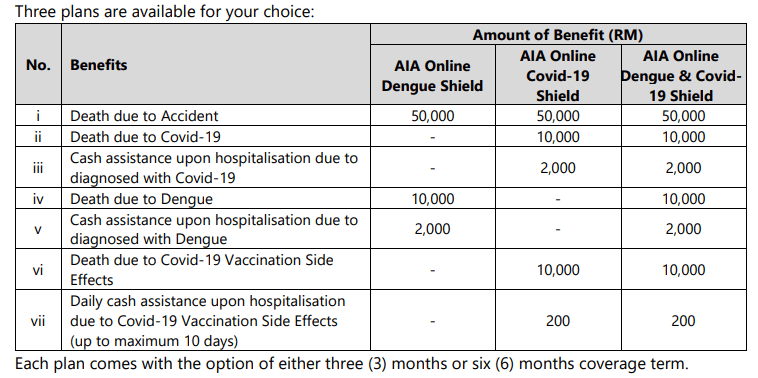
- Affordable premium ranging from RM19.90 to RM59.90;
- Get covered easily without health declaration required;
- Claims process fast and easy.
To buy/for more info: https://www.aia.com.my/en/our-products/online-products/aia-online-shield.html
p
ii. Etiqa e-Medical Pass Insurance:
Covers for hospitalization at a Private or Government hospital for admission due to Covid-19.
Coverage**:

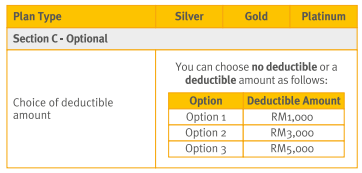
For more info, or to buy/get quotation: https://www.etiqa.com.my/v2/health-insurance-takaful/e-medical-pass-insurance
**Attention: This product has a 30-days waiting period. Meaning you’ll not be covered in the first 30 days upon the activation of your protection.
p
(3) Reach out to a trusted financial planner or agent for guidance.
Finally, if you are unsure or overwhelmed (which is normal: I was overwhelmed, too), I'd highly recommend you to seek help from insurance professionals:
-
Licensed Financial Planner
A licensed financial planner offers comprehensive financial planning from insurance, investment, and estate planning (eg. will-writing). If Covid-19 makes you realize the importance of reorganizing your finances, I highly recommend you to reach out to a licensed financial planner.
Find out my experience working with my financial planner HERE, and register for your free financial consultation session towards the end of the article!
-
Reliable, full-time insurance agents
If you need to get clarification for your questions fast, or have coverage inquiries for a specific insurance company, feel free to reach out to the list of full-time insurance agents below.
These are my personal connection, and they are ready to provide swift assistance with your inquiries. Just say that you are coming from No Money Lah's article and they'll attend to your questions.
p
| Insurance Company | Agent | Contact (Whatsapp) |
|---|---|---|
| AIA | Ashley | Click HERE for inquiry/assistance |
| Allianz | Brad | Click HERE for inquiry/assistance |
| Prudential | Khoh | Click HERE for inquiry/assistance |
| Hong Leong Assurance (HLA) | Rita | Click HERE for inquiry/assistance |
p
Covid-19 Test Fund (CTF): Claim your Covid-19 testing fee!
[Update 21/5/2021]: Unfortunately the RM10 mil CTF is fully claimed. I'll update this section if the relevant parties are willing to add additional funds to CTF.
The Covid-19 Test Fund (CTF) is established by key insurance bodies in Malaysia to support the Ministry of Health's (MoH) to conduct more COVID-19 testing.
Medical insurance policyholders and takaful certificate holders may apply for reimbursement up to a maximum of RM300 for COVID-19 testing (one reimbursement per individual).
Eligibility:
- Insurance policyholders and takaful participants with group/individual medical and health insurance policies and takaful certificates who undergo COVID-19 tests at recognized private labs listed on MoH's COVID-19 website.
p - The CTF reimbursement is limited to one test per policy/certificate holder only and the reimbursement period is valid until 30/6/2021 or earlier, if the fund is fully utilized.
p - Persons Under Investigation (PUI) and any asymptomatic policy/certificate holder is entitled to claim as follows:
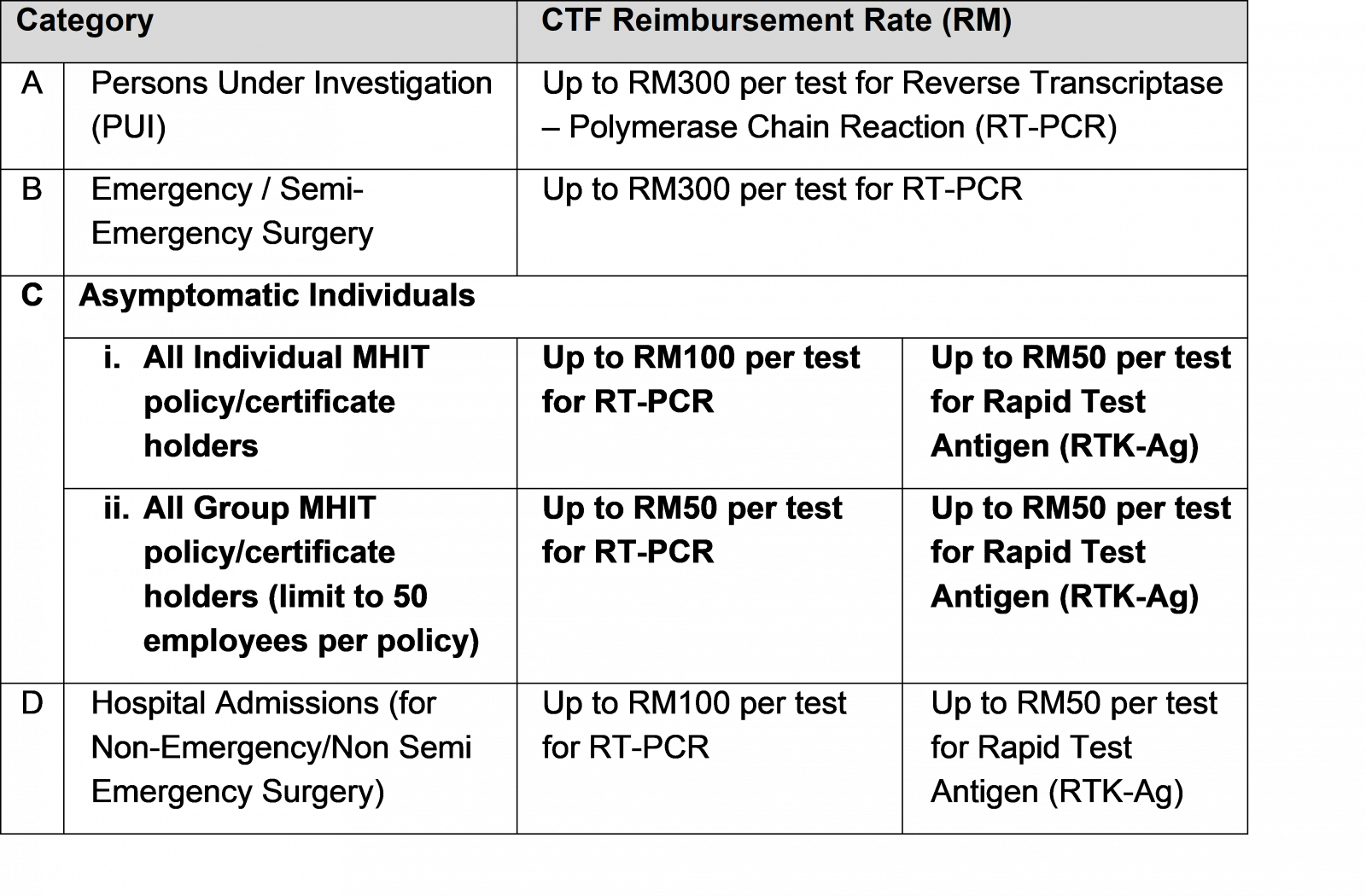
More info: https://www.myctf.my/ (p.s. Don't worry if you can't understand the requirements/eligibility on the website, because I couldn't get it too lol, my advice: just apply)
p
What can the insurance industry do better for customers?
If you are reading this article, it is most likely you are unclear, or worse, uninformed about your Covid-19 coverage. Have you ever wonder why you are uninformed?
In my opinion, this is because insurance companies and many agents (not all) are doing a POOR job in updating customers about their Covid-19 coverages.
Personally, I have family members with insurances from Great Eastern, Prudential, Allianz, and AIA. NONE (TAK ADA, MEI YOU) of the agents have reached out and inform us about our coverage from the pandemic. I believe most of you have such experience too.
So let me make my statement here:
To people in the insurance industry, up your integrity and professionalism. Most of you say that insurance is about serving than selling. Prove your words with practical action, please.
(p.s. Kudos to the minority reliable & responsible insurance agents out there)
p
No Money Lah's Verdict (+ how to support the blog?)
So here you go - the compilation of coverages of Covid-19 from major insurance companies in Malaysia.
I know how miserable it can get to live in this pandemic era. As such, I wish this compilation gives you clarity in your insurance needs or planning throughout this challenging period.
If you find my article helpful, there are a few ways you can do to support my blog:
- Stay at home and register for your Covid-19 vaccine!
p - Consider using my referral links for your personal finance/investment needs HERE. This helps me big time in sustaining the blog!
p - Subscribe to my FREE email newsletter HERE for weekly personal finance and investment content from me!
I am sure many of you have some burning questions, feel free to leave your comment in the comment section below - I'll do my best to help! 👇
Disclaimer:
- This article is produced based on my best research. I may miss out on certain details so I cannot guarantee the full accuracy of this article. Please use this article only as a reference.
- This article is not meant to be financial advice. Please seek guidance from a licensed financial planner before making important financial decisions.
Investing Wisdoms, But Vaccines
Not sure about you, but I find the way different people respond to the Covid-19 vaccines very fascinating.
This is especially true when it comes to the voluntary jab of the AstraZeneca (AZ) vaccine.
Some downright rejected the vaccine due to the fear of risk over blood clots. Some were hesitant and missed out on the offer. Some, just like my mom (and eventually my whole family), were decisive.
To me, the scenes above look just like people’s behavior when it comes to investing, don’t you think?
Now, there is no absolute right or wrong way to make decisions, but I do think there are ways we can use to make better ones:
p
Risk-to-Reward: Are you worrying about the right thing?
Consider these few things:
Everyday since mid-April, there are more than 2,000 Covid-19 cases in Malaysia, with Klang Valley ‘proudly’ leading the numbers most of the days.
According to Malaysia’s health ministry, the chance of developing blood clots after taking the AZ vaccine is only around 0.0004%. This is much lower compared to taking birth control pills (0.05-0.12%) or being a smoker (0.18%).
On the other hand, the AZ vaccine has about 70 – 80% effectiveness against the virus.
A 4 out of 1,000,000 risk (low risk) vs a 70 - 80% protection against the virus (high reward)? I’d happily take the odds.
p
Time in the market > timing the market
To wait for your preferred vaccines because the AZ is ‘risky’ is like an attempt to time your investment for the best entry: you never know for sure when it is happening.
I especially love this quote from British Medical Journal, by Professor Paul Hunter (University of East Anglia medical school in the U.K.):
“To decline a vaccine today because it is the Oxford-AstraZeneca or Johnson & Johnson vaccine in the hope of being able to get another vaccine sometime later carries a real risk of dying from Covid-19 before being able to get a preferred vaccine."
On the other hand, the compounding effect of getting vaccinated ASAP is massive:
The sooner we get vaccinated, the sooner we can protect ourselves and the people we care and love.
The sooner people get vaccinated, the sooner we can get businesses and the economy running.
The sooner the world is reopening, the sooner I can go travel *sobs*.
See? Time in the market. You get the point.
--
This weekend, I’ll be taking my first jab of the AstraZeneca vaccine. Fingers crossed, I don’t wake up the next day looking like Eddie Peng.
[Sponsored] Why I trade Futures instead of Stocks? (+Learn to trade risk-free!)
Trading is a business that requires skills and knowledge. Moreover, what you choose to trade is also equally important, as every market offers different opportunities over another.
In this article, I’d like to share why I purely trade futures over stocks, and how you can learn to trade futures risk-free via Kenanga Futures ‘Experience Futures Today’ campaign!
p
Highlights of Futures
- Futures represent an agreement to buy or sell an asset at a future date at an agreed-upon price.
p - For everyday traders like ourselves, our goal is to seek value & profit from price changes in the futures market, which is very similar to stock trading. (ie. Buy high sell higher/short-selling)
p - There are many types of futures products to trade such as Indices, Commodities, Metals, and Energy.
p - From today to 23rd May 2021, you can learn how to trade futures risk-free via Kenanga Futures ‘Experience Futures Today’ campaign! Experience perks like weekly webinars, 1-on-1 coaching, and virtual trading game to win prizes up to RM13,000!
p
What are Futures?
Let’s start by answering an important question: What are futures?
Futures represent an agreement to buy or sell an asset at a future date at an agreed-upon price.
Let’s imagine you run a bakery business and your main ingredient is flour. Logically, any price fluctuation in flour would affect your profit margin. So, if you foresee a potential increase in flour price in the near future, what can you do?
One way you can protect yourself (a.k.a. hedge) against this is by entering into an agreement with a flour supplier today. In this agreement, you and the supplier would agree to transact flour one year from now (May 2022) with today’s price (May 2021).
Hence, if the price of flour does increase a year from now, you are protected against the price hike as you have secured your flour with a cheaper price – neat business decision!
p
How do Futures work?
The example you have just read above is an extremely common practice among businesses.
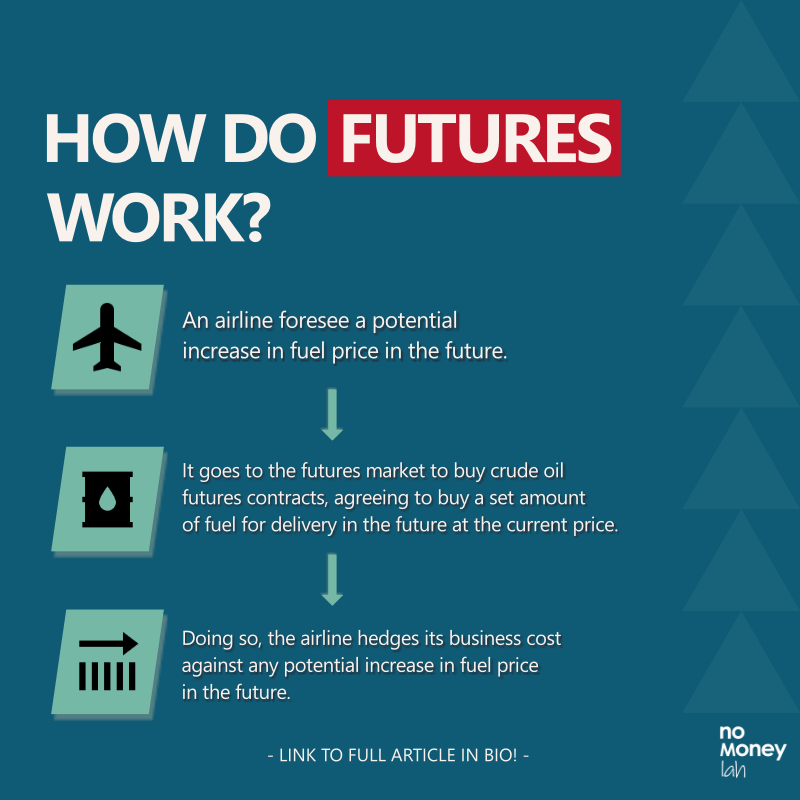
Consider companies like AirAsia and its fuel supply:
Let’s say AirAsia wants to lock in its fuel prices to avoid an unexpected increase in price. So, what they’ll do is to buy a contract in the futures market, agreeing to buy a set amount of fuel for delivery in the future at a specified price.
In this case, AirAsia uses the futures market to protect themselves from unexpected risk and price swings in fuel supply.
p
What does the Futures market mean for everyday traders like you and me?
While the futures market is often used for hedging by businesses, it is also a great market for traders to participate in to express their trade ideas.
In other words, we do not participate in the futures market to exchange for a product in the future.
Instead, our role is simple: to seek value & profit from price changes in the futures market itself (eg. Buy high sell higher/short-selling). If the price of crude oil rises, the futures contract itself becomes more valuable, and traders could sell it for more in the futures market.
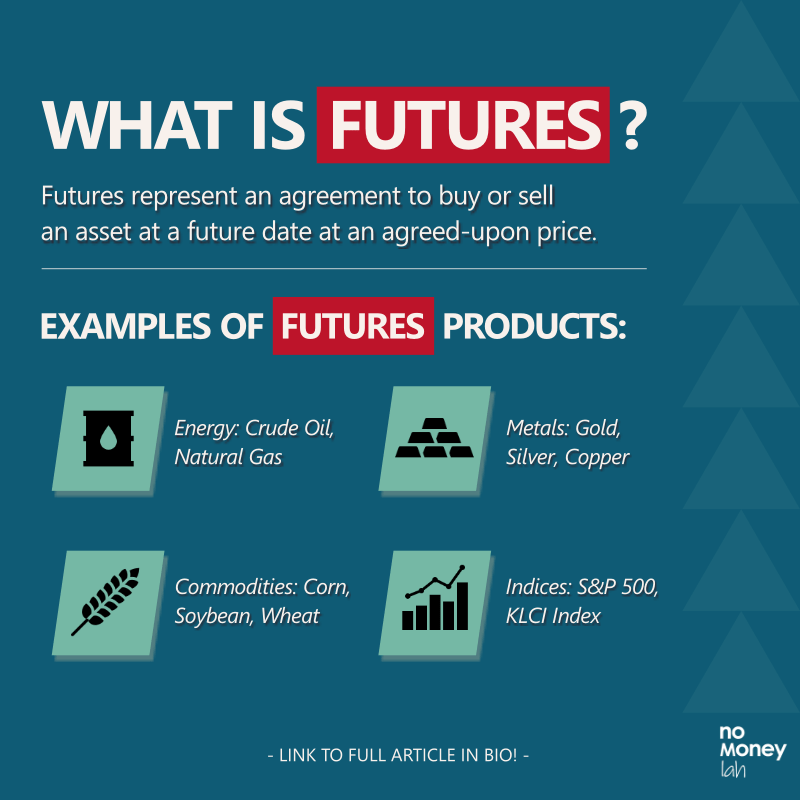
Through the futures market, traders gain access to various types of products, such as:
-
- Energy: Crude Oil, Natural Gas etc.
- Metals: Gold, Silver, Copper etc.
- Commodities: Soybean, Corn, Wheat etc.
- Indices: S&P 500, NASDAQ, Dow Jones Industrial Average, KLCI Index etc.
As an example, a trader could be anticipating a rise in gold price in the near future. Instead of buying physical gold (which can be troublesome), the trader can express his/her opinion by buying a gold contract via the futures market. Soon, if the price of gold does go up, the trader can sell off the contract in the futures market and make a return with the difference in price.
p
Futures vs Stock Trading: Why I purely trade Futures over stocks
Usually, most people would relate trading to stocks. That was my initial assumption too when I was first exposed to trading.
That said, if you are embarking on your trading journey, you should really consider checking out the futures market as well. Below are 5 reasons why I purely trade futures over stocks:
#1 Futures offer Higher Leverage
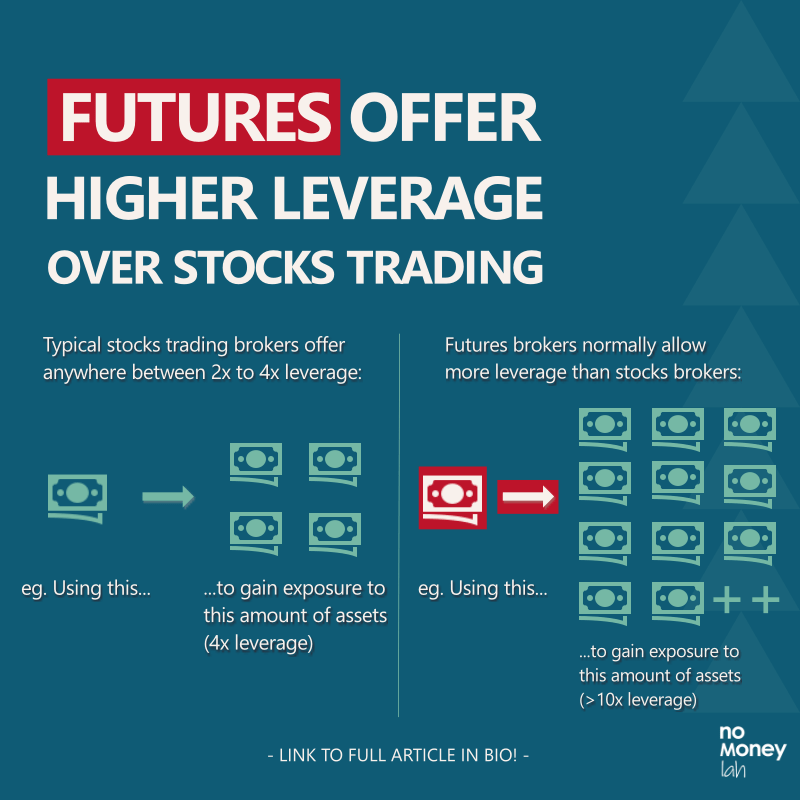
Leverage is the buying or selling of an asset by paying only a portion of the price, while the remainder is covered by a lender (ie. Our brokers). While I do not recommend people to invest using leverage, but when it comes to trading, having and knowing leverage well can be very powerful.
Generally, typical retail stock trading brokers offer traders anywhere between 2:1 to 4:1 leverage. So, let’s say a stock trader wants to trade 100 units of Apple shares ($130/share), which sum up to $13,000. With a 2:1 leverage, the trader will need to fork out $6500, which is half the capital needed in order to trade.
On the contrary, the leverage offered in the futures market is more generous. Most futures broker normally offers a margin requirement between 3% - 12%. So, let’s say I want to trade an E-Mini S&P 500 futures contract that’s worth $205,000 ($50 Multiplier * 4100 Index Price), I’ll only need $10,250 (assuming 3% margin) in my account to execute my trade.
In other words, my leverage is 20:1, where I’ll need only $10,250 capital to trade $205,000 worth of asset.
Through the futures market, traders can trade a large futures contract with a relatively small amount of capital.
One important thing before we proceed: Leverage is a financial tool that comes with its advantages and risks. Please learn and understand both the upsides and downsides of leverage before using it in trading.
p
#2 Liquidity & Transparency
The stock market is a relatively fragmented market compared to the futures market. As an example, there are 13 stock exchanges in total in the US.
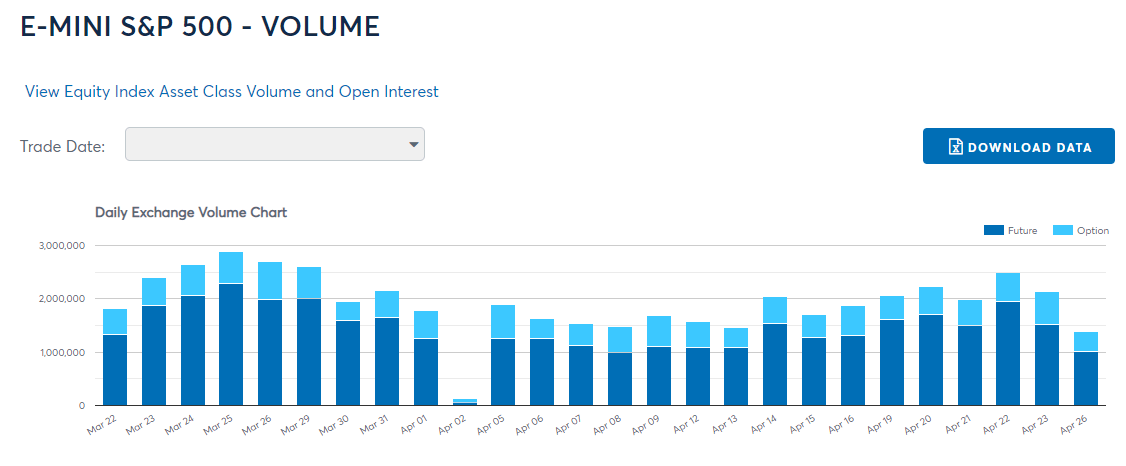
On the other hand, the futures market is very consolidated. In the US, there are 2 major futures exchanges (The CME Group & Intercontinental Exchange (ICE)). Hence, all futures transactions must go through these exchanges, leading to concentrated liquidity and volume.
As a result, concentrated futures liquidity allows buyers and sellers of futures contracts to be matched at the desired price easily & accurately.
In addition, important indicators such as volume, open interest, and bid/offer spread are transparent and available readily for traders. Having these data is crucial as they offer better clarity to traders to make better trading decisions.
p
#3 Less Restriction Compared to Stock Trading
As traders, having the freedom to express our opinions into a trade idea is crucial. Meaning, I’d want to have the least friction on when and how I should long or short the market.
However, the stock market is embedded with rules that may not be best in favor of traders. As an example, the Regulated Short Selling (RSS) program only has limited securities that traders can short. Furthermore, limits are imposed to prevent excessive short-selling activities.
In comparison, there is no such restriction in the futures market and traders are free to express their trade ideas in any direction.
p
#4 Better Focus
In stocks trading, traders would need to go through hundreds of stocks in search of the ones that’d actually move in accordance with their strategies. It is common to see stock traders having multiple stocks that they are monitoring. The combined effort of filtering and monitoring multiple stocks can be overwhelming.
On the other hand, most futures traders usually need to focus on only 1 or 2 futures products to trade. More so, I have seen traders trade only 1 to 2 products, and make a full-time living out of it. Personally, I am trading purely the E-Mini S&P 500 futures, which gives me enough movement and volatility to execute trades most of the day.
p
Experience Futures Today by Kenanga Futures: Learn futures trading risk-free (& get rewarded!)
Now, it is impossible for me to go through futures trading in detail in a short article like this. But don’t fret, because now you can learn about futures trading risk-free via the ‘Experience Futures Today’ campaign by Kenanga Futures!
From today until 23rd May 2021, the ‘Experience Futures Today’ campaign by Kenanga Futures allows traders to learn about futures trading. In my opinion, it is great for people that are keen to start trading, but not quite sure how. Below are the highlights of the campaign:
p
Part 1: Virtual Futures Trading Game with total prizes worth RM13,000 to be won!
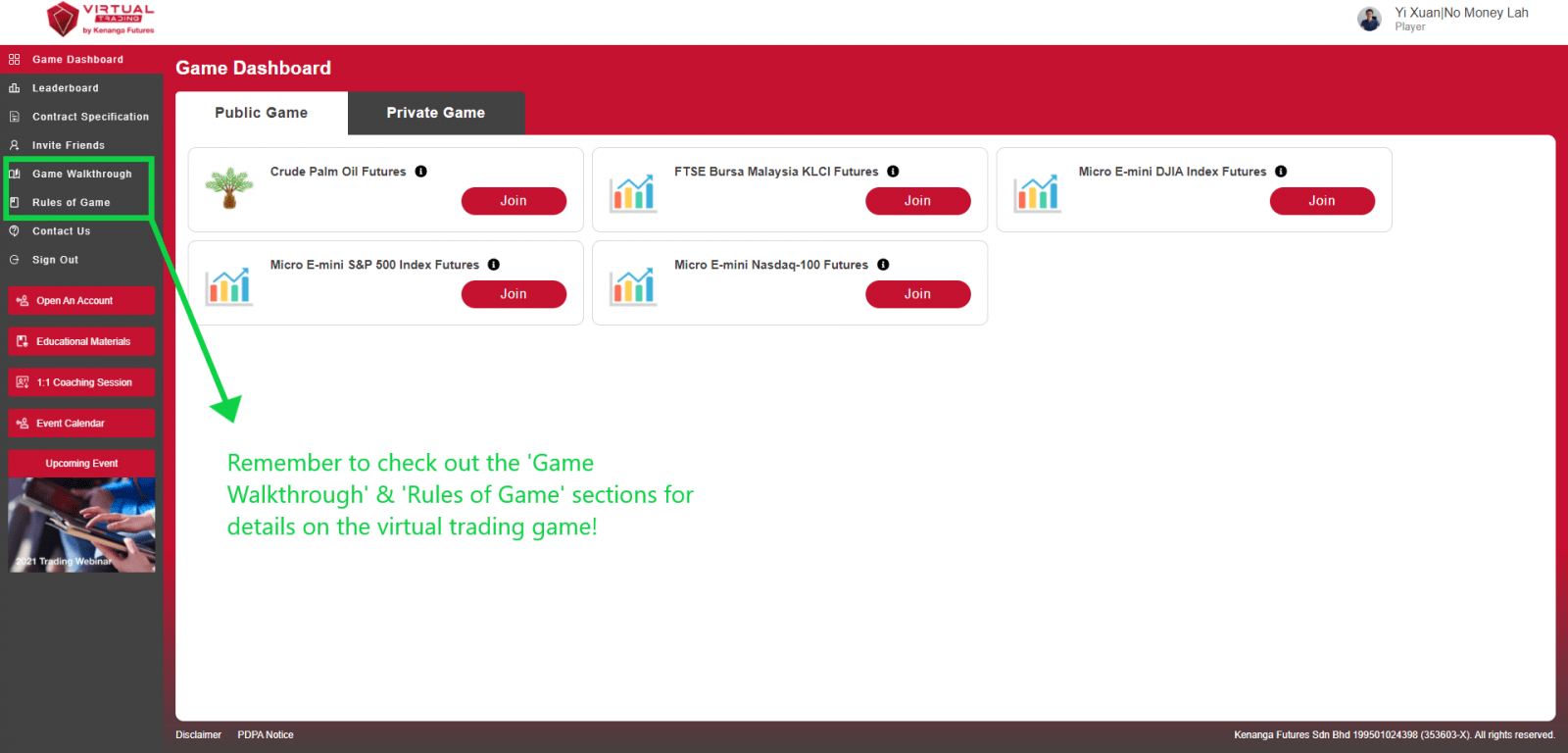
To start, Kenanga Futures has created a virtual trading game for you to get a taste of futures trading.
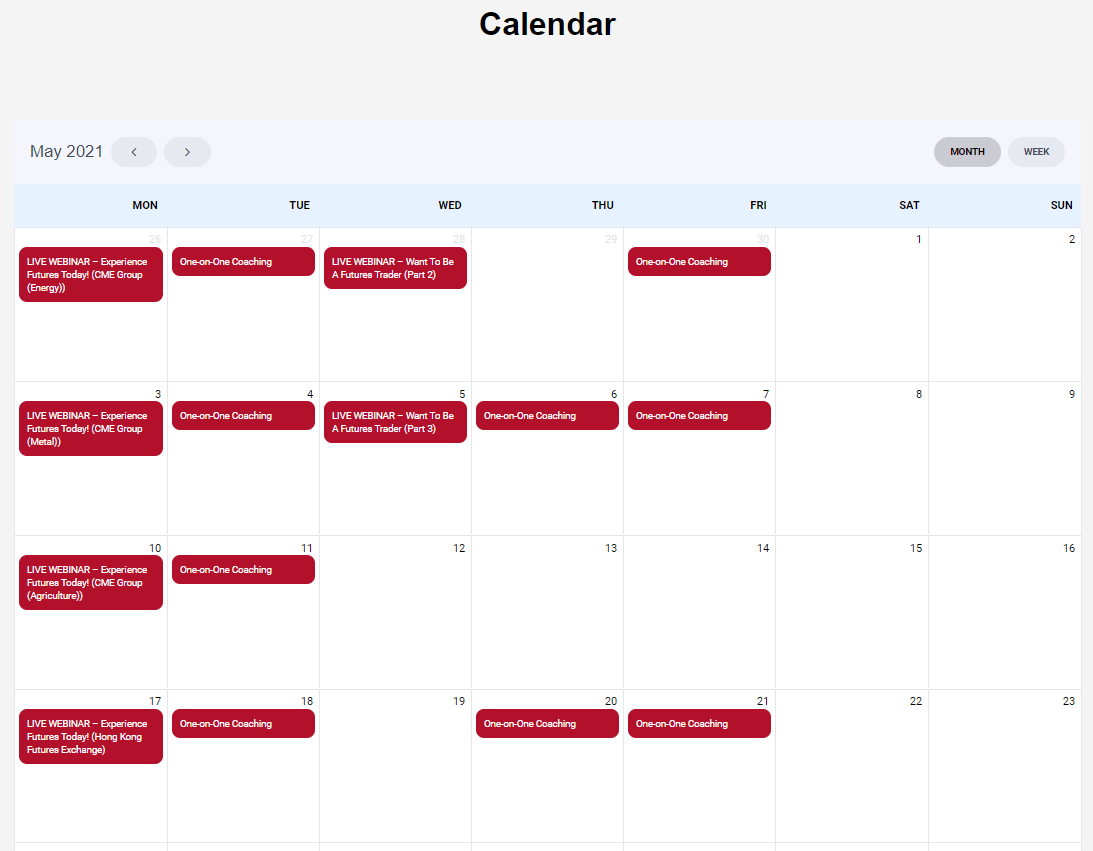
On a weekly basis (until 23rd May 2021), you’ll be able to participate in a virtual trading game for different futures products:
- 3rd – 9th May 2021: Gold, Silver, and Copper Futures
- 10th – 16th May 2021: Soybean, Soybean Oil, Corn, and Wheat Futures
- 17th – 23rd May 2021: Hang Seng Index and Hang Seng China Enterprises Index Futures
p
Before you start, be sure to click on the ‘Game Walkthrough’ and ‘Rules of Game’ sections as they provide guides on how to play the game and execute your trades virtually.
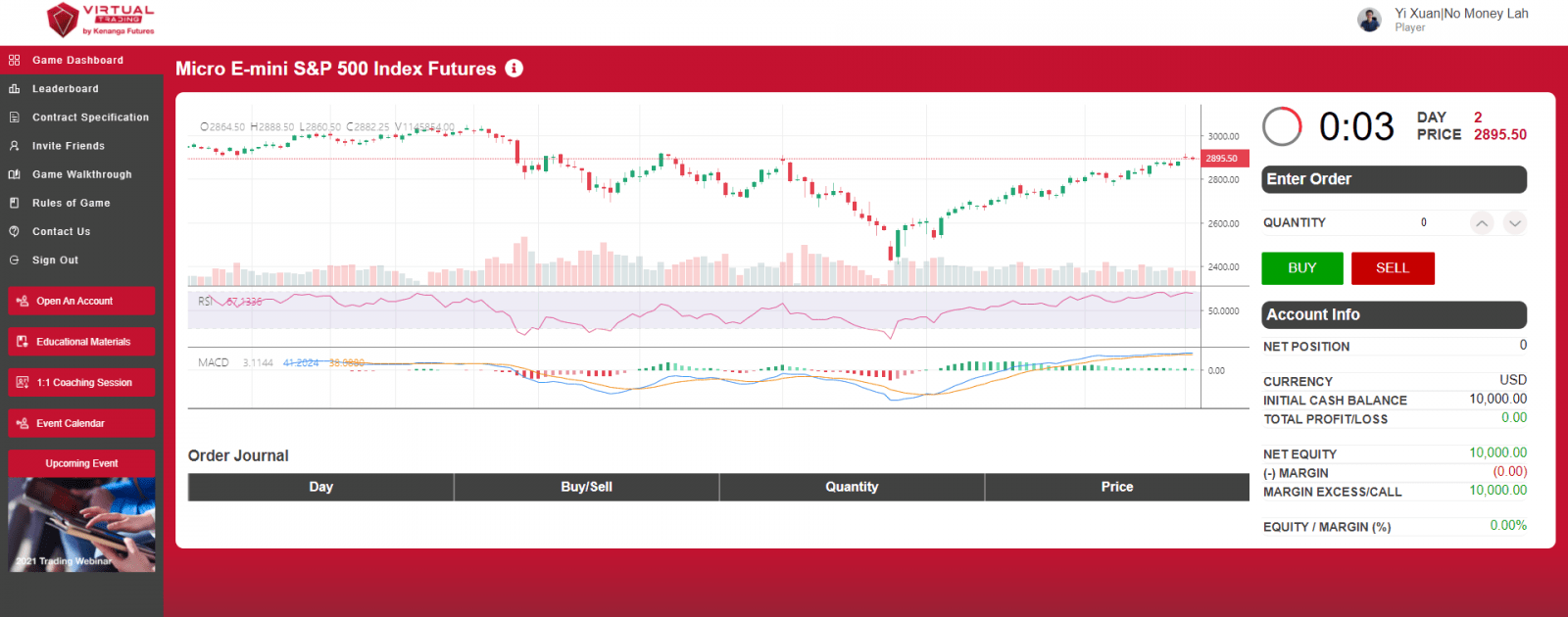
After reading the guide, you can now pick any futures product and start your virtual trading game!
p
Every week, the top 10 ranking players with the highest accumulated Return of Investments (ROI) in the leaderboard for each futures product will win up to RM200 worth of Grab food vouchers. Even better, you can participate in trading more than one futures product so you can win even more Grab food vouchers!
For the full terms & conditions, click HERE.
p
Part 2: Weekly Webinars on Futures Trading
Every Monday and alternate Wednesday, the ‘Experience Futures Today’ campaign will also organize webinars on futures trading and products.
Through these webinars, you can learn more about futures trading and the characteristics of specific futures products such as metal and agriculture futures.
p
Part 3: Free 1-on-1 Coaching on Futures Trading
Perhaps my favorite perk of this campaign, is you can book a free 1-on-1 coaching session to learn more about futures trading.
These sessions happen every Tuesday, Thursday, and Friday on a first-come, first-serve basis.
During the coaching session, you can learn about risk management, fundamental & technical analysis in the futures market, and how to use Kenanga Futures’s proprietary KDF TradeActive Platform.

p
How to Join the ‘Experience Futures Today’ Campaign?
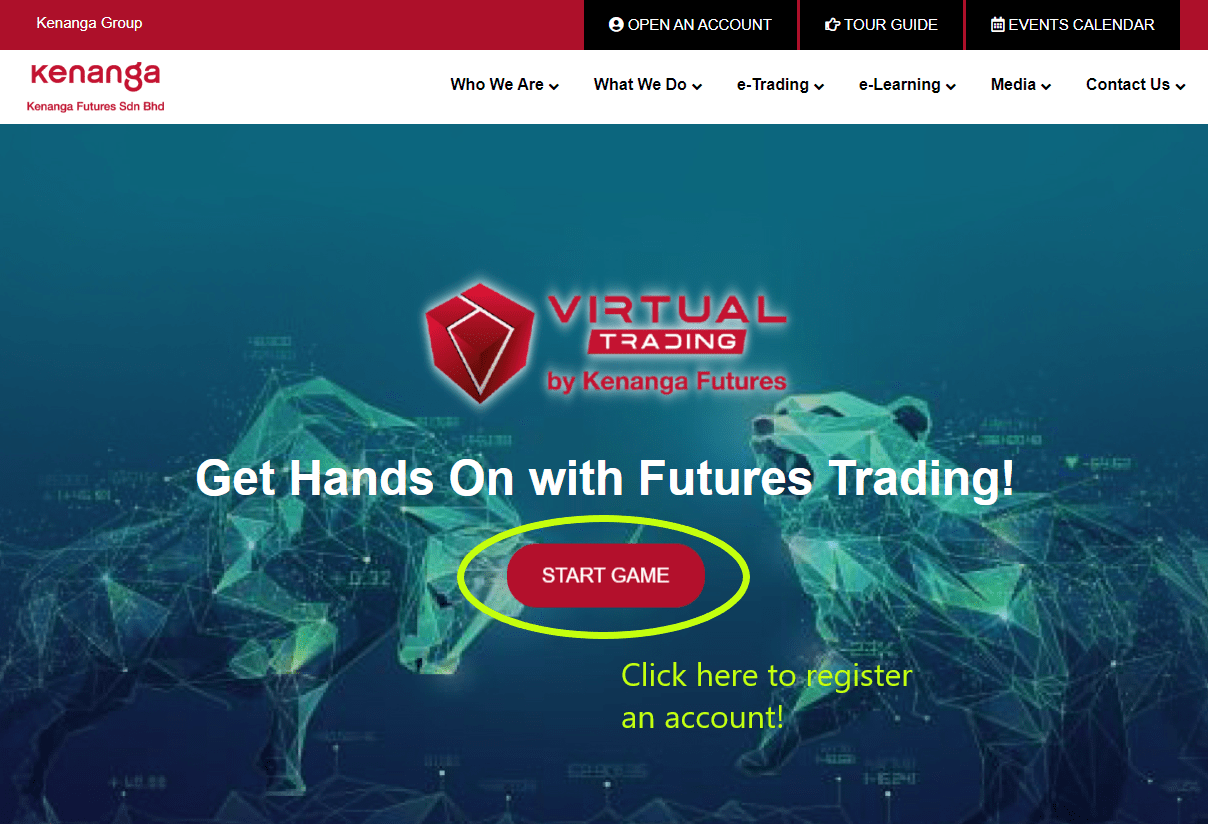
The ‘Experience Futures Today’ Campaign by Kenanga Futures is open to all Malaysians above the age of 18, including permanent residents living in Malaysia.
To participate, just register an account at www.kenangafutures.com.my/kfvt/. Once you have completed your registration, you will have full access to the virtual trading game and all the other perks that come with this campaign!
If you are looking to learn about the potential of futures market to your trading journey, certainly check out what the campaign has to offer!
p
Final words on Futures Trading
As a trader that is working to improve my craft everyday, I can firmly say that trading is not easy. However, with proper guidance on how futures work, as well as deliberate practice, one can increase his/her odds of succeeding in the markets.
The key here is to treat trading as a serious business that takes time to grow, and not a shortcut to make you rich fast. Learn well, trade well!
Disclaimer:
This article is kindly sponsored by Kenanga Futures. The timing for this article is perfect because as a futures trader myself, I have always wanted to share about futures trading with you all.
For the full terms & conditions of the ‘Experience Futures Today’ campaign, click HERE.
Leverage is a financial tool that comes with its advantages and risks. Please learn and understand both the upsides and downsides of leverage before using it for trading.
ChiNext Index: Invest in the Innovative Industries in China
In this month’s Invest in China Series, we are going to look at the ChiNext Index.
With the world going through significant shifts, such as the Covid-19 pandemic to the rise of electric vehicles, innovative businesses play a crucial role in saving mankind and making human life better.
If innovation is your thing, then this article will be one that you’d want to read – so let’s get going!
p
Highlights of the ChiNext Index:
- The ChiNext Index tracks the top 100 innovative & fast-growing companies (measured by market cap) listed on the ChiNext Market, which is a subsidiary of the Shenzhen Stock Exchange.
p - The ChiNext index started trading in 2009. The index hosts innovative companies from a diverse range of industries including healthcare, IT, and industrial businesses.
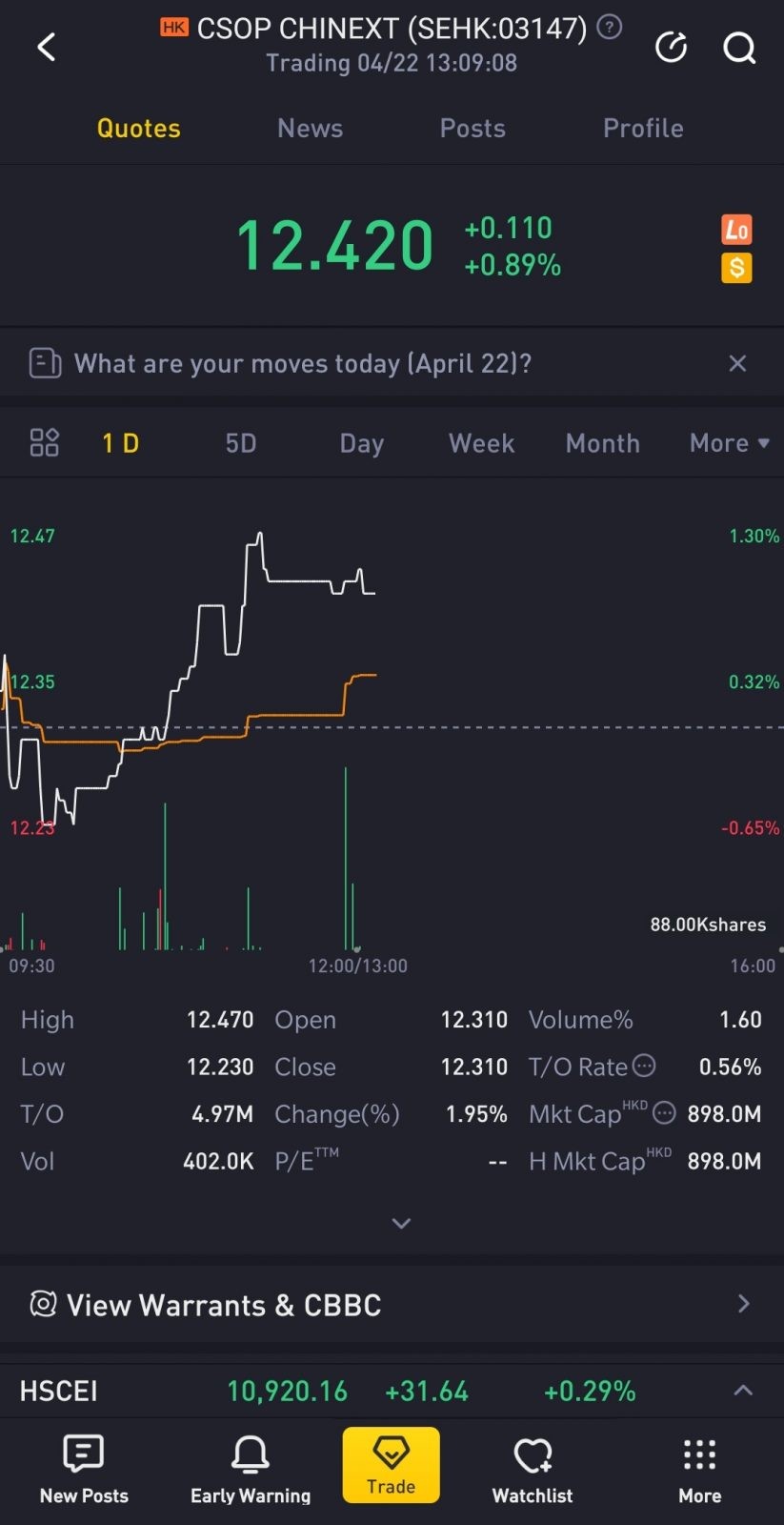
p - One cannot invest directly at the index. Instead, we can do so via ETFs that track the index – such as the CSOP SZSE ChiNext ETF (ticker: 3147).
p
What goes into the ChiNext Index?
The ChiNext index is established to attract innovative and fast-growing businesses, especially high-tech firms. As such, it is also perceived as China’s equivalent of the US’s Nasdaq 100 Index.
In other words, the ChiNext index offers investors a simple way to invest in China’s home-grown innovative companies. This is because the index hosts future-proof companies that produce the ever-important healthcare technologies, to battery suppliers of electric vehicles (EV).
That said, not every company in the ChiNext Market can become part of the elite ChiNext Index.
To become part of the index, a company has to be in the top 100 in terms of market cap. Also, the index is adjusted and rebalanced on a semi-annual basis to ensure the relevance of the index.
p
ChiNext Index Performance
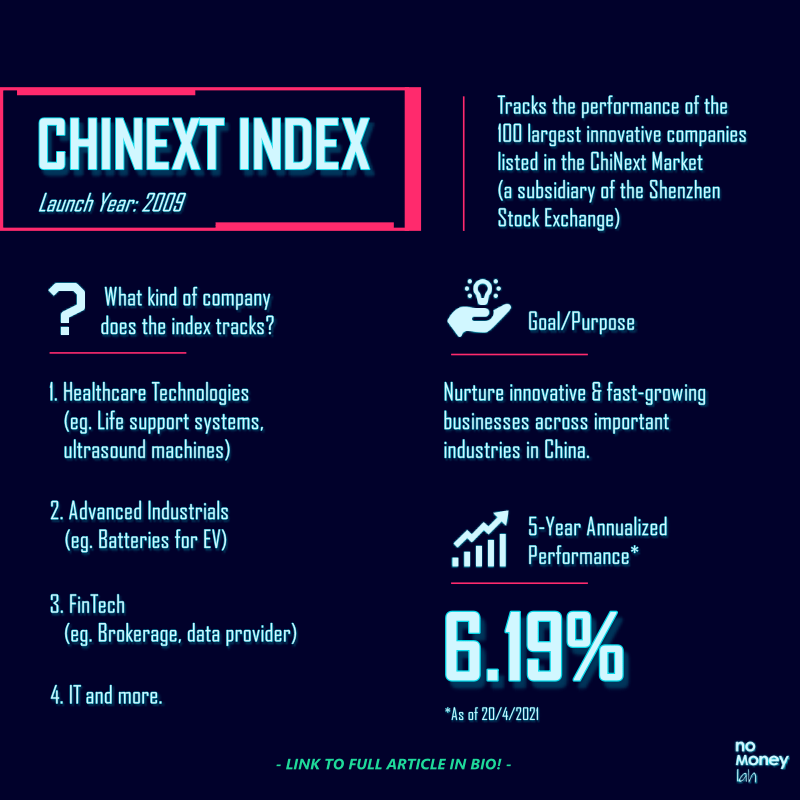
As of 20/4/2021, the ChiNext Index recorded a 5-year annualized return of 6.19%.
A 5-year 6.19% annualized return means that money invested 5 years ago in the index has grown by 6.19% every year.
p
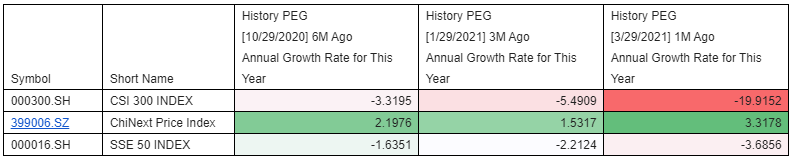
In terms of Price/Earnings-to-Growth ratio (PEG ratio), the ChiNext Index has been recording a positive PEG ratio for the annual growth rate for 2021. Compared to the negative PEG ratio of major Chinese indices like the CSI 300 Index and Shanghai SE (SSE) 50 Index, a positive PEG ratio of the ChiNext index would likely indicate a positive growth anticipation for 2021.
p
ChiNext Index vs STAR 50 Index vs Hang Seng TECH Index
In this ‘Invest in China’ series, I have covered 3 China tech & innovation-focused indices, namely the ChiNext Index, STAR 50 Index, and the Hang Seng TECH Index.
The question is, what are the differences between all these 3 indices?
Essentially, there are 2 main elements that differentiate the ChiNext, STAR 50 and Hang Seng TECH Index from each other:
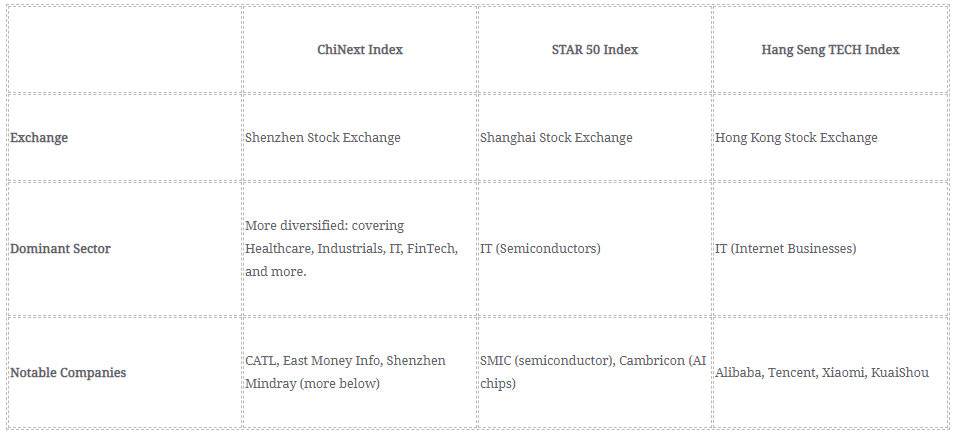
Firstly, all three indices host companies that are listed in different stock exchanges – ShenZhen (ChiNext), Shanghai (STAR 50), and Hong Kong (Hang Seng TECH).
Secondly, each index has its own theme by hosting innovative companies from different niche, as shown in the table below:
READ MORE: Hang Seng TECH Index Review, STAR 50 Index Review
p
CSOP SZSE ChiNext ETF: Your Gateway to Invest in the ChiNext Index
An index is not something that one can invest in directly. Instead, investors can invest in Exchange Traded Funds (ETFs) that track the performance of the index.
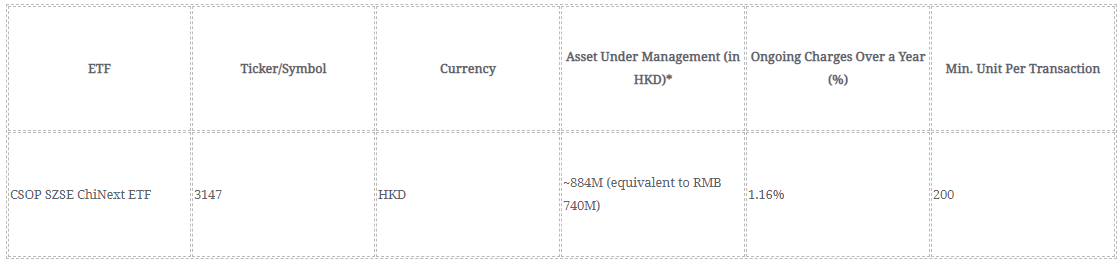
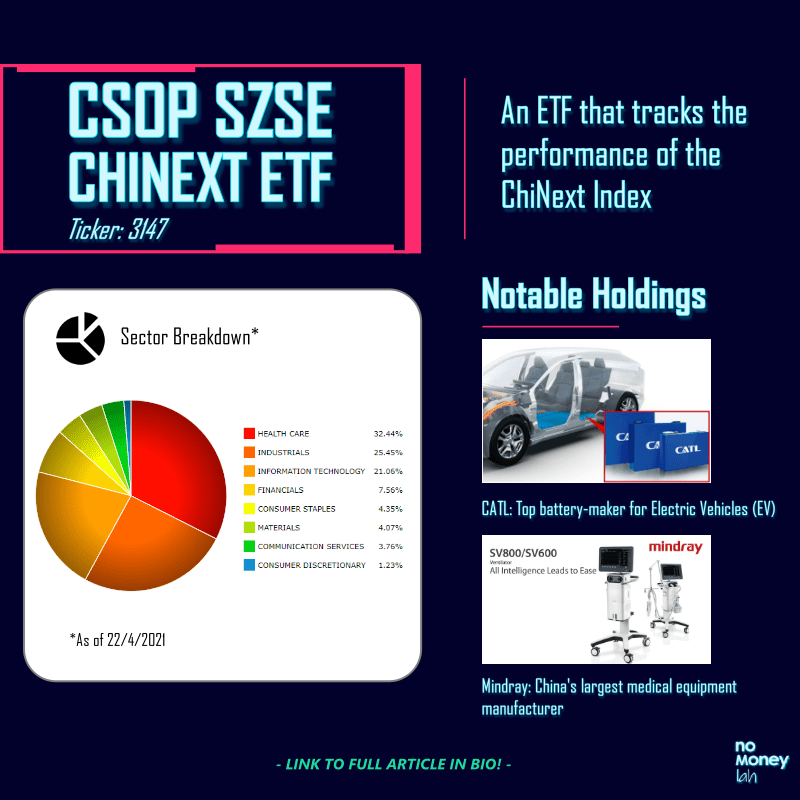
One such ETF is the CSOP SZSE ChiNext ETF. This is an ETF that tracks the performance of the ChiNext Index, where investors can invest even with small capital.
To track the ChiNext Index, the ETF adopts a combination of physical representative sampling and synthetic representative sampling strategy.
p
p
Notable Holdings of the CSOP SZSE ChiNext ETF
In this section, I’ll be sharing with you some notable companies in the CSOP SZSE ChiNext ETF that caught my eyes:
#1 Contemporary Amperex Technology Co. Ltd (CATL)
We all know that the electric vehicle (EV) business is a huge thing and with massive growth potential.
Behind the scene, CATL is one of the dominant battery manufacturers in the EV industry, with association with big names like Toyota, Volkswagen, Volvo, and more. According to UBS, the demand for battery cell supply to meet the increasing growth of the EV industry will tighten in 2021 and there’d be a global shortage by 2025.
In other words, this means that the EV industry is rapidly growing. CATL, being an incumbent battery manufacturer is at a significant cost advantage to grow alongside the demand.

p
#2 East Money Information Co. Ltd
East Money Information is a Chinese online financial company that offers various online financial services such as brokerage service, investments in unit trusts & bonds, paid datafeed, and more.
Think of East Money Information like Rakuten Trade and Fund Supermart, but in steroid. In fact, the company is so huge that in 2020, its growth in share price made the company more valuable than notable bank, Credit Suisse.
p
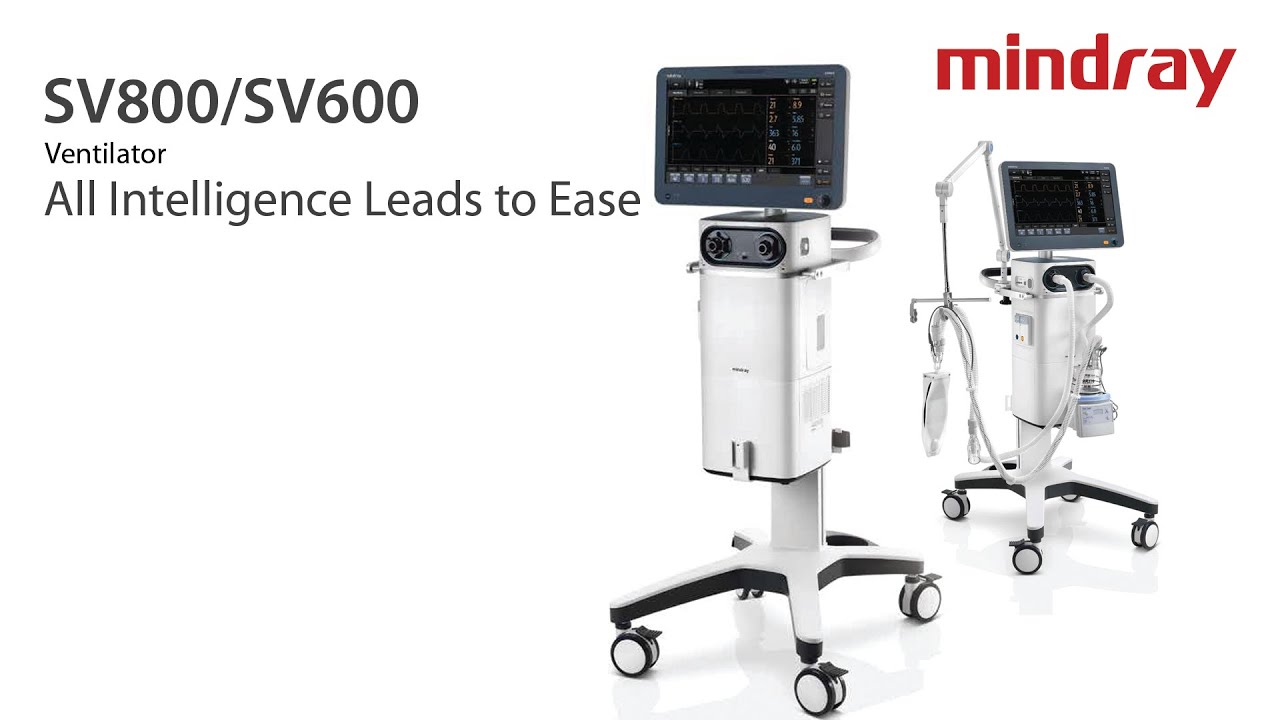
#3 ShenZhen Mindray Bio-Medical Electronics
Mindray is China’s largest medical equipment manufacturer, with a presence around the world.
It is a company that makes medical equipment such as patient-monitoring and life-support systems and ultrasound machines.
With the world living in pandemics and a society full of health concerns, Mindray is poised with a huge room to grow.
p
What You Need to Know + Risks of Investing in the ChiNext Index
#1 Higher than Average Fluctuation
The companies in the ChiNext market are made up of innovative or small/medium-sized enterprises. Many of them are usually in their early development stage with a smaller operating scale and shorter operating history.
As such, these businesses are usually subject to higher uncertainty and more fluctuations in their performance. Therefore, investors that are investing in the ChiNext index should expect bigger swings in the performance of the index.
p
#2 Delisting Risk
Being an index that is made up of companies in the fast-moving innovation industry, investors need to be aware of the risk of component companies being delisted when they become irrelevant or not in compliance to the ChiNext Index’s listing conditions.
p
Who Should Invest in the ChiNext Index?
Similar to the STAR 50 Index that I have reviewed, the ChiNext Index is certainly China’s initiative to nurture innovation via the capital market.
Accessing the opportunities and risks, the ChiNext Index is certainly NOT for everyone. New investors or investors with lower risk tolerance should probably skip the ChiNext Index, and perhaps look into the Hang Seng TECH Index for Chinese tech-enabled internet businesses like Alibaba and Tencent.
That said, the ChiNext Index can be a good investment option for:
- Opportunistic investors that are having a long-term view towards China’s innovative growth in ever-important industries like healthcare, industrial production, FinTech, and more.
p - Experienced investors with a good grasp on China’s growth & development.
p
My Recommended Broker to Invest in CSOP SZSE ChiNext ETF (Ticker: 3147):
As you may have guessed by now, CSOP SZSE ChiNext ETF is not listed locally. Instead, it is being traded in the Hong Kong stock exchange in Hong Kong Dollar (HKD).
As such, you’ll need a reliable stock broker with access to the Hong Kong stock exchange in order to invest in this ETF.
If you do not have a stock broker, I’d highly recommend Tiger Brokers to you. Tiger Brokers is my go-to regulated stock broker that provides all-in-one access to markets such as the US, Singapore, and Hong Kong stock market – all at a highly competitive fee.
Check out my full review on Tiger Brokers HERE.
ALSO READ: How to Invest in Your First Stock via Tiger Brokers
p
No Money Lah’s Verdict
All in all, the ChiNext Index is an interesting index that hosts China’s top innovative companies from various industries.
For investors looking to gain exposure to the potential of China’s innovation, the CSOP SZSE ChiNext ETF offers a great solution to invest in the ChiNext Index easily even with small capital.
Do you have any questions on the ChiNext Index? Feel free to let me know your thoughts & questions in the comment section below!
About CSOP Asset Management
I first discovered the ChiNext Index through CSOP Asset Management (AM).
If you have been investing purely in the Malaysia or US market, it is likely that you have not heard of CSOP AM before. However, CSOP AM is huge in the China & Hong Kong market:
Established in 2008, CSOP AM is the first offshore entity established by a regulated Chinese asset manager with Hong Kong’s Securities & Futures Commission (SFC) type 1 (dealing in securities), type 4 (advising on securities) and type 9 (asset management) licenses.
With this background, CSOP AM manages the biggest renminbi (RMB) equity & fixed income ETF listed in offshore China.
In late 2019, CSOP AM sets up their office in Singapore, with the goal to bring China’s gradually opening capital market to Southeast Asia’s investors (psst… that’s us).
In essence, through CSOP AM ETFs, foreign investors like you and me have the opportunity to gain exposure to China’s growing capital market.
Disclaimer
The purpose of this post is purely for sharing and should NEVER be taken as a buy/sell recommendation. Please do your own research AND/OR reach out to a licensed financial planner before making any investment decision.

Money Decisions: Do these 6 things for your parents BEFORE it’s too late!
‘Personal’ finance is never personal. It’s not just about us, but the people we cared about the most: our parents.
One thing is certain as we grow up: our parents are getting older at the same time.
Inevitably with aging, the risks and occasions where money is needed increases – retirement, physiotherapy, medical treatments, and so on.
In my opinion, here are 6 money decisions that you must do for your parents before it’s too late:
p
#1 Find out the insurance coverage of your parents
Insurance is a taboo among most Asian families.
Ironically, we do not talk about insurance until it’s too late. Another problem that I experienced personally is many of my parents' agents have a poor track record of follow-up over a long period of time (some are not even in the business anymore).
As such, don’t be surprised if our parents:
- Do not know with clarity what kind of coverage they have, and;
- Assume that they have enough protection with the policy they bought in the early 2000s.
Generally, there are 3 things that you need to know:
- Life Insurance: Do your parents have any existing loans/financial commitments at hand? If yes, having adequate life insurance is important! In case of death, life insurance can help in lifting the financial burden off for the family (while also paying for the funeral).
p - Critical Illness (CI) Protection: Are your parents still actively working and supporting the family’s everyday expenses? If yes, then having proper CI protection is crucial as an income replacement to support the patient’s recovery and family expenses in case of illness like cancer.
p - Medical Coverage: This is perhaps the most important protection that you need to make sure your parents have as they age. Medical coverage comes in handy in the event of hospitalization or any critical medical conditions that usually require expensive treatment.
Action Plan:
Get help from either a licensed financial planner or a trusted insurance agent, do not attempt to do this alone.
- If your parents have their policies, go get a financial planner/insurance agent to do a policy review for you. Alternatively, get in touch with your parents’ insurance agents for this (Tip: Keep their contact!).
p - Find out the existing insurance coverage of your parents. Which policies have lapsed, and what kind of coverage is still in-forced?
p - Find out if your parents’ coverage is relevant to their age and financial condition. Then, do whatever you can according to your own financial capability.
Now, dealing with this can be overwhelming especially if you are not familiar with insurance. I know this because I felt the same when I was finding out my parents’ coverage – and I have some basic understanding of insurance.
But this is not something you can delay any further. The longer you delay this, the more expensive it gets for you to address the underlying issue especially if your parents are under-protected.

READ: How is it like to engage a licensed financial planner in Malaysia?
p
#2 Do your parents have enough for retirement?
After working for nearly 3 decades of their life, it’s only natural to assume our parents have a decent saving for retirement, right?
Honestly, you’d never know. Some of you may even be surprised by your discovery.
Things like the money needed for you and your sibling’s university education, money that was taken out of EPF as the down payment for your home, monthly mortgage repayment – these are just the tip of the iceberg of the kind of expenses that can eat into your parents’ retirement savings.
Action Plan:
Regardless, it’s important to find out if your parents have enough for a comfortable retirement. The less financial literate your parents are, the more important it is for you to do this ASAP.
When overwhelmed about this, get help from a financial planner (p.s. NOT insurance agents, because many of them do not do holistic financial planning).

READ: How my financial planner helped improved my finances!
p
#3 Do your parents have too much cash stashed in their bank account?
Many parents may have worked very hard in their career, but they neglected an important part of personal finance: investing.
Again, don’t be surprised to discover that your parents have a huge sum of cash just sitting there in their bank account over the years.
In this case, it is crucial for you to encourage your parents to invest their cash to beat inflation and generate yield.
Action Plan:
Depending on the risk tolerance of your parents, robo-advisors like StashAway and Wahed are great as they can adjust to their risk profile and invest accordingly into a combination of equities, commodities, and bonds.
Otherwise, at the very least, consider shifting the cash to low-risk money market funds through StashAway Simple, BEST Invest Money Market Fund, or Versa to enjoy FD-like returns, without the troublesome lock-in period.
FIND OUT MORE: StashAway Review, StashAway Simple Review, Wahed Review, BEST Invest Money Market Fund
p
#4 Do your parents have a will?
Will is another taboo that most families rarely talk about until it's too late.
The problem is, without a will, you’d have a lot of issues when it comes to managing assets upon the demise of a family member. From claiming the assets to the allocation of assets, things can get very complicated without a will.
For your own sake, go ask your parents to set up a will.
Action Plan:
Contrary to what most people think, setting up a simple will is not hard. In fact, anyone can set up a will through Maybank online will-writing service for a small fee easily.
However, if your parents have more assets in possession (eg. Stocks, bonds, real estate), it is best for you to get a professional estate planning service instead.
FIND OUT MORE: What is Estate Planning, and how to set up a proper will through a licensed financial planner?
(EXCLUSIVE: In this link, use referral code ‘nomoneylah30’ and get a FREE estate planning consultation session via the form at the bottom of the page!).
p
#5 Save for Family-specific expenses
Even if your parents are in a good financial state, it is wise for you to allocate some savings specifically for family purposes.
Saving specifically for family allows you to spend on the people that truly matter to you, without feeling additional financial pressure.
Nothing comes close to buying your parents’ a good pair of jogging shoes, right? :)
Action Plan:
Personally, I save for family-related expenses through my favorite robo-advisor, StashAway. By setting up a dedicated portfolio, I automate my savings on a monthly basis which can be withdrawn anytime for family-related expenses.
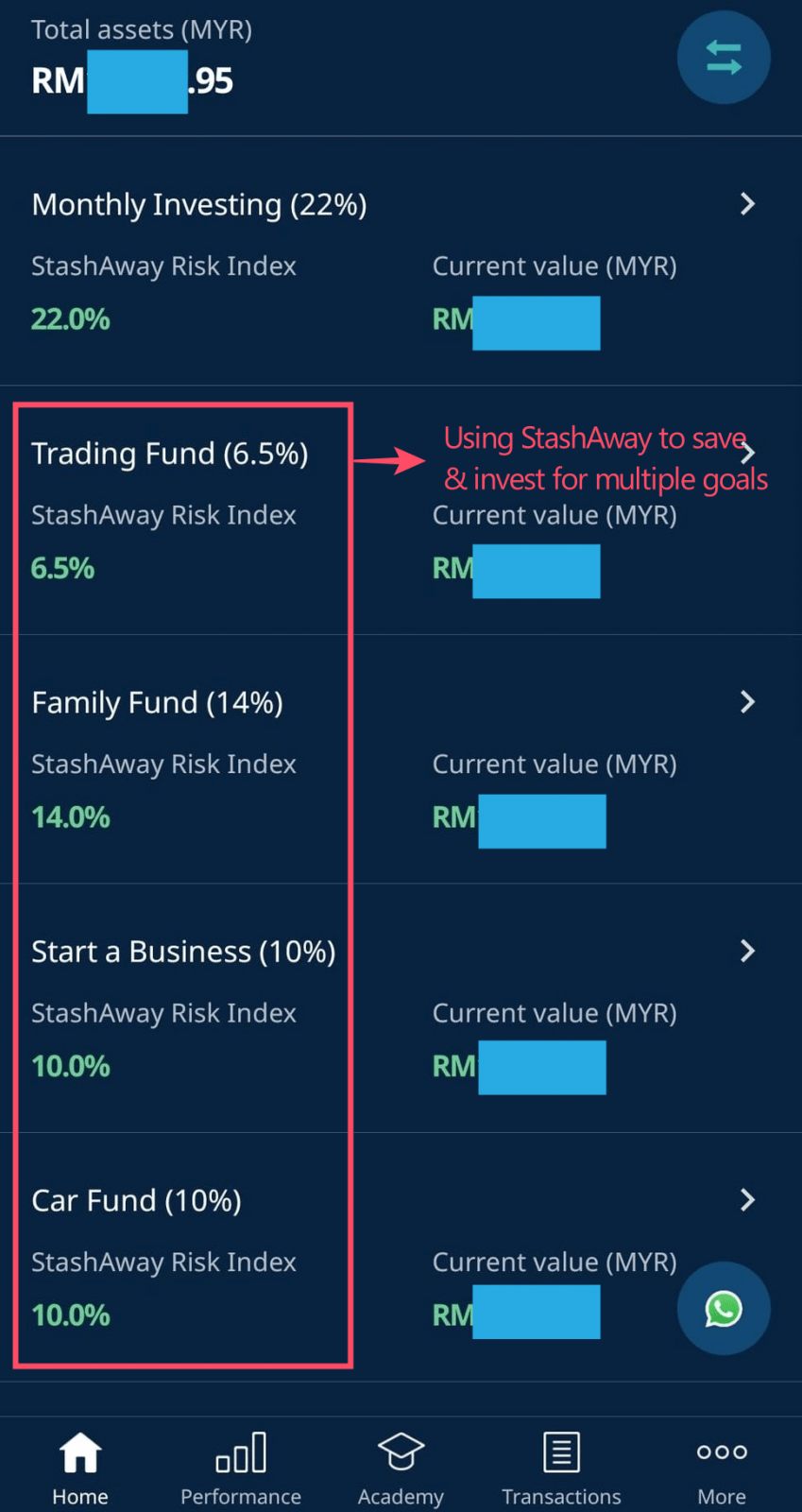
Referral Code: Open a StashAway account using my StashAway referral link HERE and get an exclusive 50% off your fees for the first RM100,000 invested for 6 months.
p
#6 Get personal accident insurance for your parents
Lastly, if your financial capacity permits, consider getting personal accident (PA) insurance for your parents. ESPECIALLY if your parents do not have medical insurance at old age!
Having PA protection can be handy, since elderly adults tend to have more risks of getting injured from their daily routine. Fingers crossed, but injuries from slipping and falling are not uncommon and the treatment can be financially demanding.
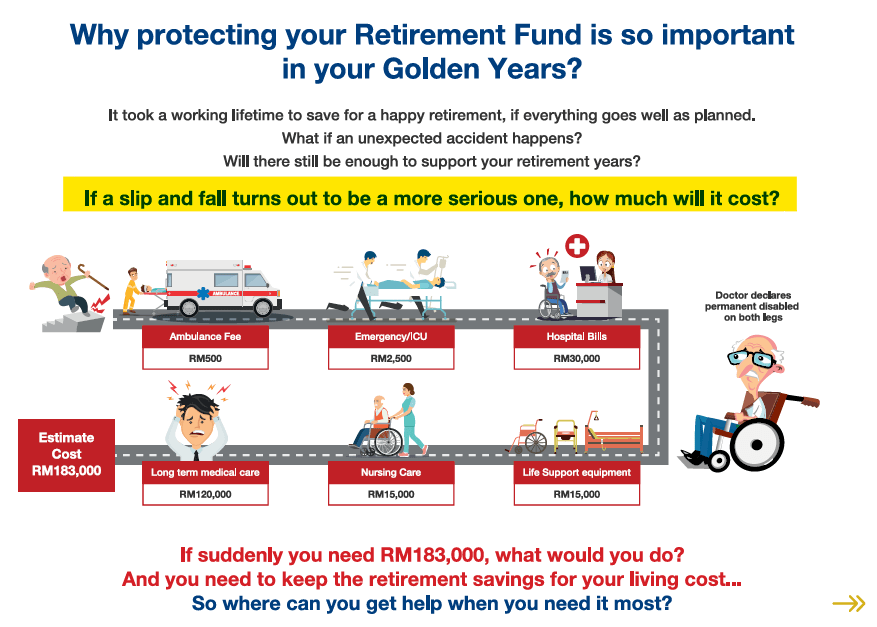
Action Plan:
Luckily, PA protection for elderly adults is very affordable. From RM270/year (RM22.50/month) for dad/mom, or RM425/year (RM35.40/month) for both parents, you can get comprehensive PA coverage for both your parents.
This particular PA insurance is the SecureMas PA Insurance from Lonpac Insurance (which I am planning to get for my parents soon). Some of the key benefits include:
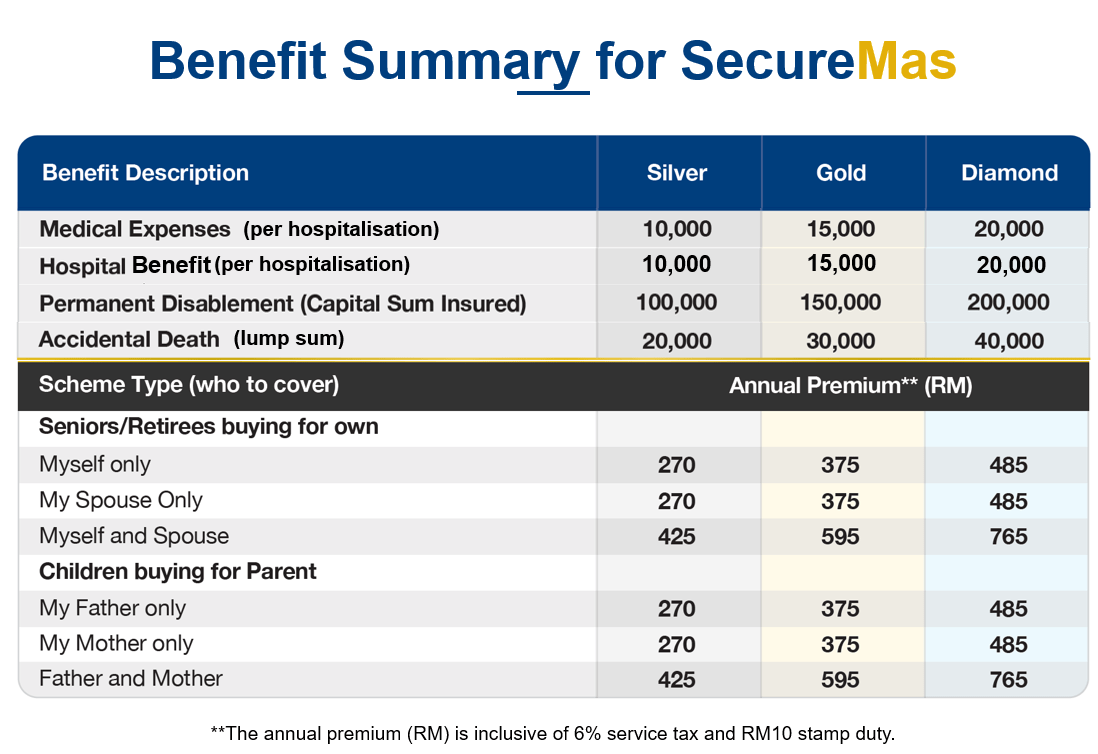
FIND OUT MORE: SecureMas PA from Lonpac Review (Benefits, How to Apply and Claim)
p
My Tips & Action Plan Summary (+ useful links)
First of all, thanks for making it till the end of this post. Things can be overwhelming if you are unaware of these money decisions that you have to make for the people you care (it was for me too!).
But without sugar-coating the reality, these are money decisions that you have to make ASAP because time is certainly not in your favor. More so if your parents are not as financially literate when it comes to money.
My advice: Take a deep breath. These are urgent things but don’t rush them. Take things step-by-step and when overwhelmed, seek help from licensed professionals.
Action Plan Summary + Useful Links:
- #1 Get an insurance coverage review for your parents
Try to reach out to your parents’ agents for this (assuming they are still in business la).
Else, get help from a trusted insurance agent or a licensed financial planner.
P
- #2 Do your parents have enough to retire?
If you want to deal with #1 and #2 together, I’d recommend engaging a licensed financial planner. Reason being, they provide more holistic financial planning services compared to an insurance agent.
READ: How is it like to engage a licensed financial planner in Malaysia? (+Find out how you can get a FREE financial planning consultation session in the article!).
P
- #3 Too much cash stashed in your parents’ bank account?
If this is the only issue to solve, then consider using robo-advisors like StashAway or Wahed to invest on behalf of your parents.
For more risk-averse parents, consider investing in low-risk money market funds via StashAway Simple for returns similar to FD, without the annoying lock-in period.
Else, if you want to solve #1, #2, and #3, seek help from a licensed financial planner.
P
- #4 Do your parents have a will?
For simple cases: you can help your parents to set up a will through Maybank online will-writing service for a small fee easily.
IF your parents have multiple asset possessions (eg. Stocks, Bonds, Real Estate): It is best for you to get a professional estate planning service instead.
FIND OUT MORE: What is Estate Planning, and how to set up a proper will through a licensed financial planner?
(EXCLUSIVE: In this link, use referral code ‘nomoneylah30’ and get a FREE estate planning consultation session via the form at the bottom of the page!).
P
- #5 Start saving for family-specific expenses
Personally, I use StashAway and set up a dedicated portfolio for this.
You can read more about my review on StashAway HERE.
Referral Code: Open a StashAway account using my StashAway referral link HERE and get an exclusive 50% off your fees for the first RM100,000 invested for 6 months.
P
- #6 Get personal accident (PA) coverage for your parents, especially if they do not have medical insurance at old age.
I recommend checking out Securemas PA protection from Lonpac Insurance. You can find out more about this insurance HERE.
Disclaimers:
This post is merely my personal opinion and experience, and should not be taken as a financial advice. Please consult a licensed financial planner before making any important financial decisions. This post may contain affiliate links that afford No Money Lah a small amount of commission (and help support the blog) should you sign up through my referral link.

SecureMas Personal Accident Insurance: The Insurance for Your Elderly Parents
SecureMas by Lonpac Insurance is an affordable Personal Accident (PA) insurance for elderly adults. In this review, let's cover the benefits and highlights of the SecureMas PA insurance, and who is it for.
p
Highlights: SecureMas PA protection by Lonpac Insurance
- Low-Cost High Cover Solution for the Senior Citizens.
p - The only Personal Accident coverage in the market with high living benefits at an affordable price. (From RM22.50/month for dad/mom or RM35.40 for both parents)
p - Includes medical expenses reimbursement, hospital income, disability benefit, and accidental death benefit.
p - Extension to cover dengue fever, food poisoning cases, and many more.
p
The Problems Faced by Senior Citizens:
If your parents are in their retirement age, chances are it will be very expensive to get them covered if they are underinsured. This is tricky, because as at our parents age, they are also extremely prone to accidents such as falling at home or injury while doing leisure sports - which the treatments can be financially demanding.
p
The Benefits of SecureMas PA Insurance
SecureMas by LonPac Insurance is a personal accident (PA) insurance that not only reimburses your parents’ medical and hospitalization expenses but also provides hospital income, disability benefit, and accidental death benefit, should they are involved in an unfortunate accident.
One great feature about SecureMas is their price: Starting at RM270/YEAR per parent (RM22.50/month) or RM425/YEAR for both parents (RM35.40/month), you can get your parents insured against accident at NO yearly price increment. This means that what you pay is the same throughout the whole coverage period regardless of the age of your parents.
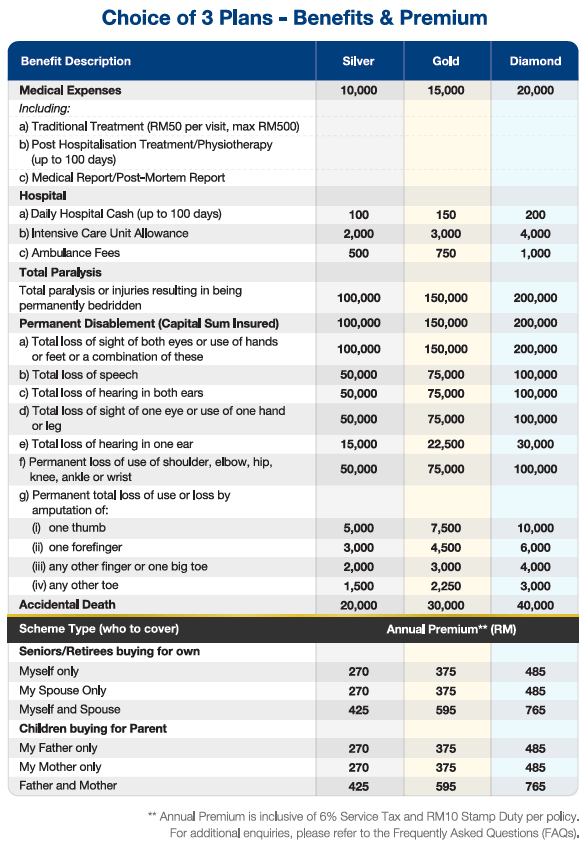
Different from other PA in the market, SecureMas offers high medical and hospitalization expenses reimbursement if (fingers crossed) your parents are involved in a fall-down accident, food poisoning, dengue fever etc.
Let's use SecureMas' Diamond plan as an example: The Diamond plan offers up to RM20,000 limit for each parent for each hospitalization with an unlimited annual limit:
For example, within one year cycle:
- January: Suffered bone fracture due to falling down – can claim medical bill up to RM20,000 limit
- June: Caught dengue fever – can claim medical bill up to RM20,000 limit
- December: Fell down again – can claim medical bill up to RM20,000 limit
p
Eligibility & Other Special Features:
- Entry age up to 70 (Last age to apply is 70 year-old)
- Accepts people with high blood pressure/hypertension and mild diabetes not requiring insulin (at no extra charges)
- No medical check-up required.
- May renew up to 100 years old and premium does not increase with age

If you are keen to get your parents protected, definitely check out the video below:
p
How to Buy/Enquire?
SecureMas is a financial protection product directed at the underinsured parents’ market. An important thing to note is that currently, SecureMas is a pre-launched product only distributed by selected Lonpac Insurance authorized agencies. Hence, the information is not up on the official website yet (but I am notified that it will be up soon!).
All in all, if you are keen to find out more/apply for SecureMas PA insurance, get exclusive access by reaching out to Lonpac Insurance authorized agency via Whatsapp by clicking on the button below.
How to Claim?
I will never be comfortable with an insurance product without knowing their claim procedures, and I think you should be aware of that, too.
p
No Money Lah’s Verdict
So, I guess that’s it for this article! Personally, I think it is the responsibility of every young adult to find out the status of financial protection within his/her family. Let’s just say it is part of adulting. The bottom line is, don’t wait till it's too late to build your financial defense line for you and your family members.
Note: SecureMas is a Personal Accident (PA) insurance that reimburses policyholders in the event of injury and/or death due to accident ONLY. It is not by any means a medical product, so there is no medical card involved. Meaning, you still have to pay for any medical expenses upfront, and your claim will come in as reimbursement upon document submissions following the claim process above.

STAR 50 Index: Investing in the High-Growth Innovative Future of China
In this month’s Invest in China Series, we are going to look at the STAR 50 Index.
With the US-China trade tension ongoing, the STAR 50 Index is certainly one of the most interesting and challenging article for me to write.
That said, I am sure this is an article that tech investors and enthusiasts will find insightful and enjoy reading – so let’s jump straight into the topic, shall we?
p
Highlights of the STAR 50 Index:
- The Shanghai Stock Exchange Science and Technology Innovation Board 50 Index (STAR 50 Index) tracks the performance of the 50 largest innovation-based companies (measured by market cap) that are listed in the Shanghai Stock Exchange Science & Technology Innovation Board (STAR Market).
p - The STAR 50 index is newly launched in July 2020. Of which, China’s home-grown information tech companies make up the majority of the index component (eg. Semiconductor companies). That said, the index also hosts companies from a diverse range of new-gen. industries including biomedicine, new energy, advanced equipment manufacturing & environmental protection.
p - One cannot invest directly at the index. Instead, we can do so via ETFs that track the index – such as the CSOP STAR 50 Index ETF (ticker: 3109).
p
What goes into the STAR 50 Index?
The STAR 50 Index is established with the goal to promote innovation in China by encouraging investments in emerging companies from the new technology sectors. As such, it is highly perceived as China’s equivalent of the US’s Nasdaq 100 Index.
In other words, the index offers an easier path for investors to get exposure to China’s home-grown innovative companies, especially crucial competitive technologies like semiconductor manufacturers.
That said, not all tech companies in the STAR market can become part of the elite STAR 50 Index.
To qualify, a company has to be in the top 50 in terms of market cap to become part of the STAR 50 Index. Also, the index is adjusted and rebalanced on a quarterly basis to ensure the relevance of the index.
p
STAR 50 Index Performance
Since the STAR 50 index is a newly launched index in 2020, there are not many details on its exact performance (yet).
That said, in 2020, the index recorded a 39.30% return.
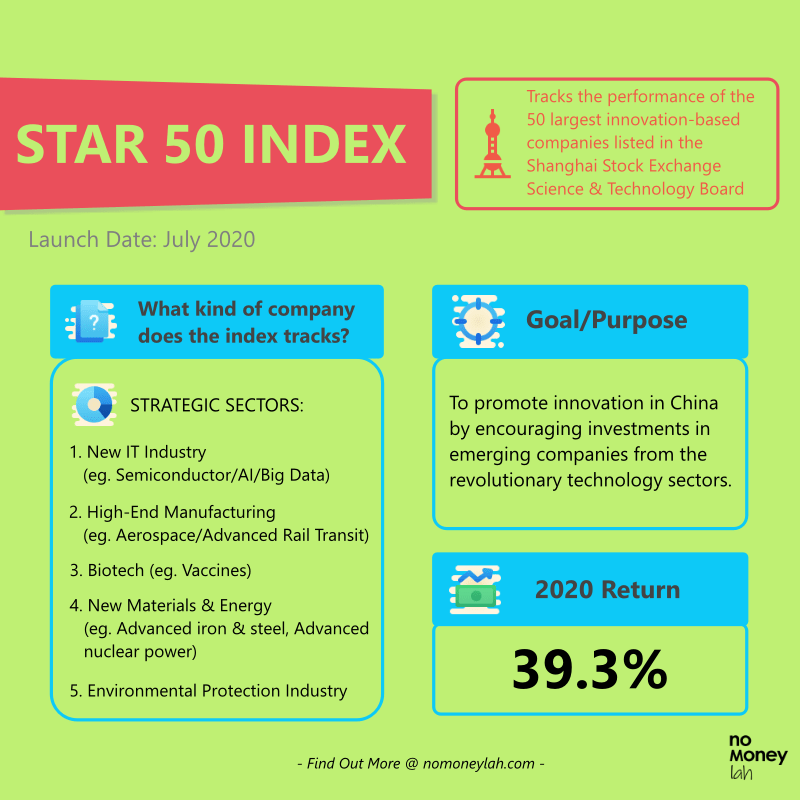
p
The Story of Chips, Semiconductors and the STAR 50 Index
Our discussion around the STAR 50 Index cannot continue without an interesting dive into semiconductors (or chips) and the ongoing US-China trade tension.
Semiconductors, or chips are a crucial part powering many transformative technologies around our daily lives, from computers, smartphones, automobiles, medical equipment, and more.
Despite this, semiconductors represent a rare area where China is dependent on the rest of the world – rather than the other way around.
China is the world’s largest consumer of semiconductors. In 2019, the value of China’s semiconductor import is over USD300 billion and it was China’s largest import item. In comparison, China supplies just 30% of its chips demand domestically.
With the ongoing US tech sanctions towards China, the Chinese government has stepped up their effort to become self-sufficient when it comes to key innovative solutions, such as semiconductors. In fact, China aims to increase its self-reliance on domestic chip production to 70% from 30% in 2019.
As such, the STAR market is China’s initiative to encourage investments into home-grown tech companies. Not surprisingly, many of the top components of the STAR 50 index is made up of semiconductor companies.
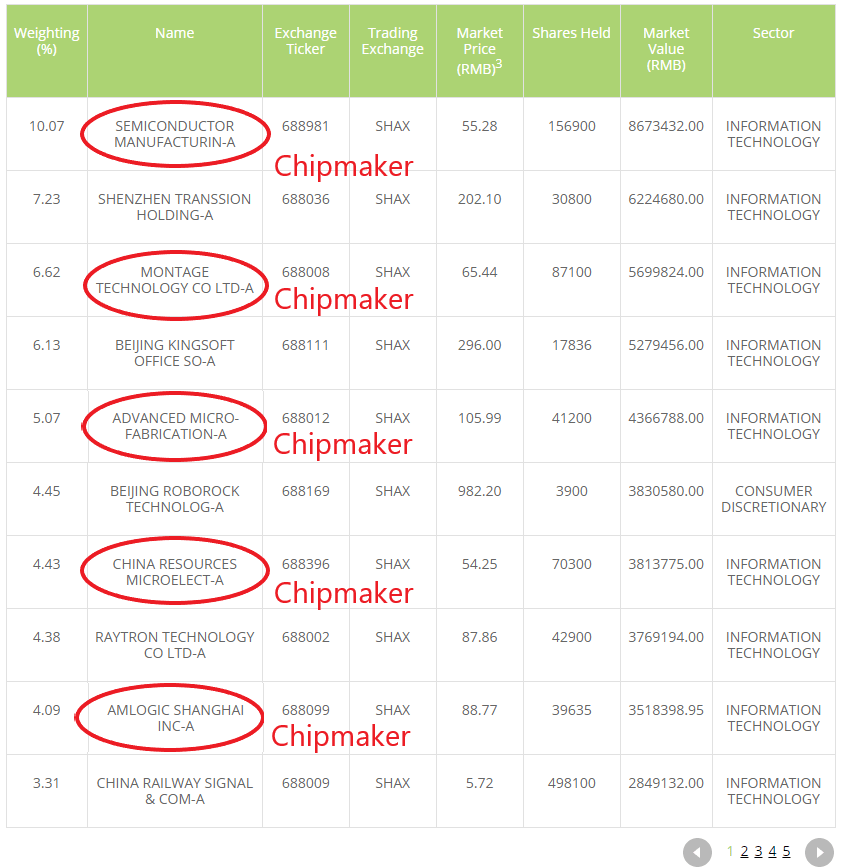
p
The Challenges of China’s Plan to become Technologically Self-Sufficient
Well, China can simply produce anything if they wish for it, right? That was my initial assumption.
Apparently, I was wrong.
Challenge #1: Technological Gap
The semiconductors business is a highly complex and advanced industry. As such, progresses in semiconductor manufacturing requires skills and expertise which cannot be developed overnight.
This is where mainland China is falling behind their competitors, such as Taiwan Semiconductor Manufacturing Company (TSMC) from Taiwan and Samsung (Korea).
When TMSC and Samsung began investing in semiconductor production in the late 1970s, China had just emerged from their decade-long Cultural Revolution that deterred scientific progress. As a result, even after multiple reforms, China still lacked the engineering skills to make an innovative breakthrough in the industry.
China’s real problem lies in its ability to manufacture high-end semiconductors. While TSMC has been able to produce high-end 5 nanometers (nm) semiconductors, China’s largest chipmaker – Semiconductor Manufacturing International Corporation (SMIC) has only recently gotten the technology to mass-produce 14nm semiconductors (p.s. the smaller the better).
In other words, China’s semiconductor manufacturer is (still) at least 5 years behind the industry leaders.
p
Challenge #2: Talent Gap
To become self-sufficient when it comes to semiconductors, the Chinese Semiconductor Industry Association estimates that China will need to close a talent gap of around 300,000 engineers.
This is not a gap that can be filled instantly regardless of how aggressive China is keen to make this happen.
p
The Potential & Opportunities of Investing in the STAR 50 Index
As a whole, the STAR market is one of China’s main initiatives to push for progress and self-reliance in innovation and technology.
While it is certainly an uphill battle for the businesses, but there are several notable opportunities that we can look into as an investor:
Short-Term: Global Semiconductor Shortages
Since the breakout of the Covid-19 pandemic, there has been a surge in global demand for consumer electronics. In return, the demand for semiconductors also spiked in tandem with the trend.
Despite that, not all the demand requires the latest and most high-end chips. Many of the demands can be fulfilled by mid to low-end chips.
Meaning, this is something that STAR 50-listed Chinese semiconductors companies like SMIC can step in and benefit from the global chip shortages.
p
Medium to Long Term: Innovations from the Higher Value Chain
Aside from conventional semiconductors and chips, the STAR 50 index is also a hub for innovative businesses that produce future-proof solutions.
Such an example is the listed companies in the index that specializes in artificial intelligence (AI) chips – a new innovation field with fewer established incumbents.
Cambricon Technologies Corp. is the first listed AI chip-maker in the Chinese stock market. It is the company that produces chips that are powering servers for Alibaba and the latest generation of Huawei’s latest AI-enabled smartphones.
If that’s not impressive yet, Cambricon also has one of the largest portfolios of patents in the field, when compared to its largest US competitor – Nvidia.
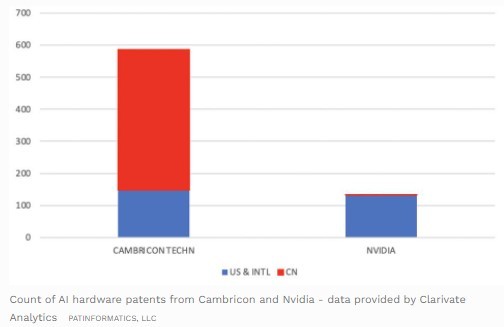
p
CSOP STAR 50 Index ETF: Your Gateway to Invest in the STAR 50 Index
An index is not something that one can invest in directly. Instead, investors can invest in Exchange Traded Funds (ETFs) that track the performance of the index.
One such ETF is the CSOP STAR 50 Index ETF. This is an ETF that tracks the performance of the STAR 50 Index, where investors can invest even with small capital.
To track the STAR 50 Index, the ETF adopt a combination of physical representative sampling and synthetic representative sampling strategy.
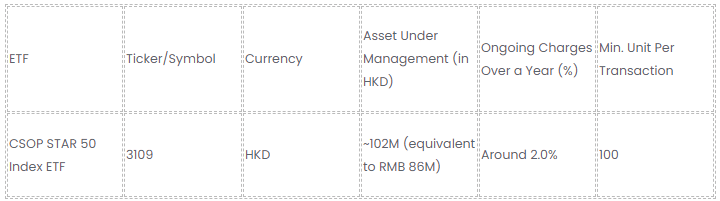
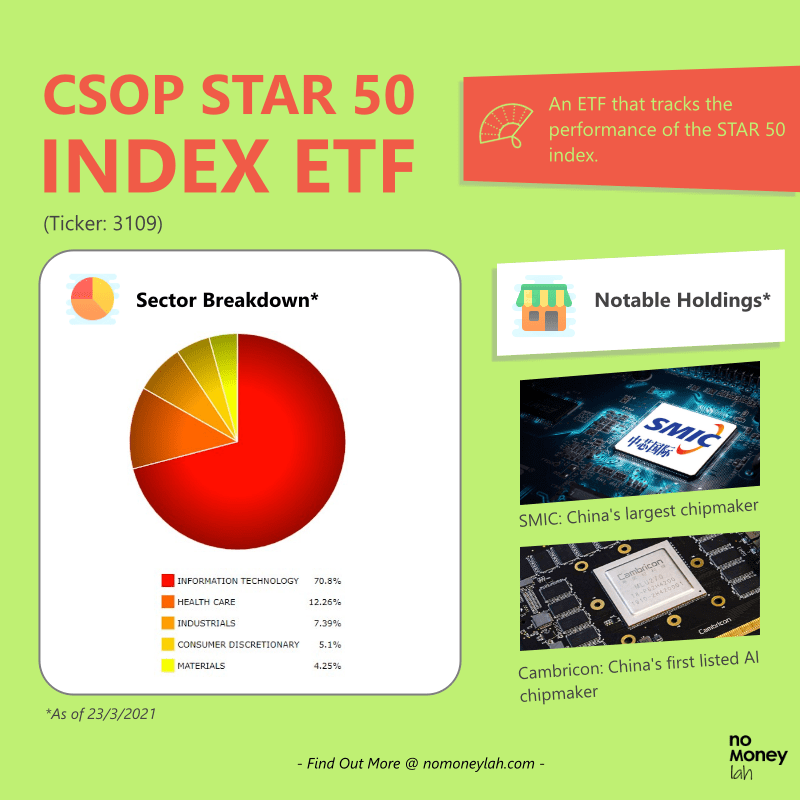
p
Notable Holdings of the CSOP STAR 50 Index ETF
In this section, I’ll be sharing with you some notable companies in the CSOP STAR 50 Index ETF that caught my eyes. Note that they may not be the top component companies of the ETF at the moment, but their potential is huge nevertheless:
#1 Semiconductor Manufacturing International Corporation (SMIC)
SMIC is China’s largest semiconductor manufacturer. It is also the largest weighting (10.05%) in the ETF as of 22nd March 2021.
As mention in the previous section, SMIC’s semiconductor technology may not be the leading chipmaker in the world. However, thjat does not mean there's no progress made. Recently, SMIC has acquired the infrastructure to mass-produce 14nm semiconductors, closing the gap between SMIC and the world's leading manufacturers.
In addition, SMIC is in a good position to benefit from the global shortage of semiconductors caused by a rise in demand for consumer electronics due to Covid-19.
Aside from that, being China’s top semiconductor manufacturer, SMIC also enjoys various support & funding from the government in order to become technologically self-sufficient.
In the recent announcement, SMIC is building a new factory worth $2.35 billion with support and funding from the government.

#2 Cambricon Technologies Corp.
Cambricon is a state-backed AI chip manufacturer that is also part of the STAR 50 index.
Optimized for deep learning capabilities, Cambricon chips are used in the likes of Huawei’s smartphone products and also powering Alibaba’s servers.
AI chip is a new frontier of the semiconductor industry of which China is focusing on to build their edge against global competitors.
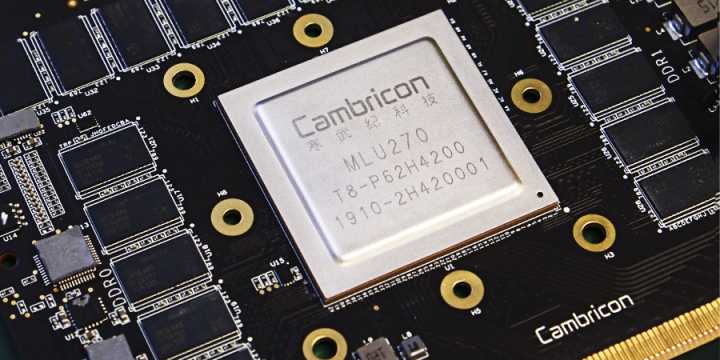
p
What You Need to Know + Risks of Investing in the STAR 50 Index
#1 Higher than Average Valuation
Since the companies in this index are generally growth companies, you should note that the index tends to trade at a higher valuation.
As of February 2021, the STAR 50 Index has a price-to-earnings (P/E) ratio of 81.60x. In comparison, China’s main CSI 300 index has a price-to-earnings (P/E) ratio of 17.63x during the same period.
In short, investors should be willing to pay a premium for investing in high-growth tech companies.
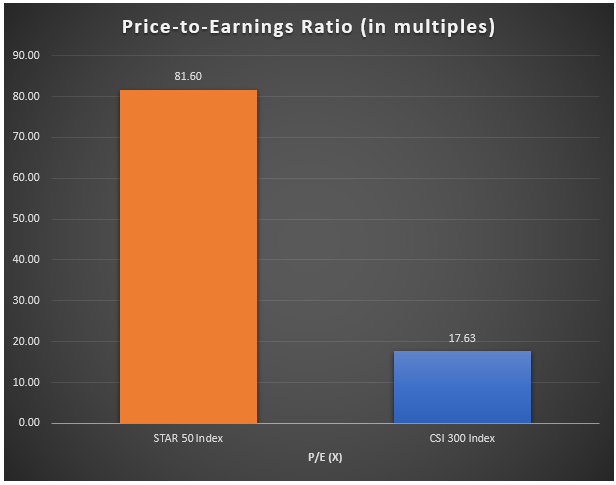
#2 Higher than Average Fluctuation
Companies listed on the STAR market are usually of emerging nature with a relatively smaller operating scale. As such, investors should expect bigger swings in both directions while investing in the index.
p
#3 Delisting Risk
Being an index that is made up of companies focusing on fast-moving technology & innovation, investors need to be aware of the risk of component companies being delisted when they become irrelevant or not in compliance to the STAR market’s listing conditions.
p
Who Should Invest in the STAR 50 Index?
All in all, the STAR 50 Index represents China’s ambition to become self-reliant and eventually, the world’s leading innovation hub.
From the opportunities and risks that entail, the STAR 50 Index is certainly NOT for everyone. New investors or investors with low risk tolerance should probably skip the STAR 50 Index, and maybe look into the Hang Seng TECH Index for Chinese tech-enabled internet businesses like Alibaba and Tencent.
That said, the STAR 50 Index can be a good investment option for:
- Opportunistic investors that are having a long-term view towards China's innovation and technological development.
p - Investors looking to capitalize on China’s government-backed drive for technological independence.
p
My Recommended Broker to Invest in CSOP STAR 50 Index ETF (Ticker: 3109):
As you may have guessed by now, CSOP STAR 50 Index ETF is not listed locally. Instead, it is being traded in the Hong Kong stock exchange in Hong Kong Dollar (HKD).
As such, you’ll need a reliable stock broker with access to the Hong Kong stock exchange in order to invest in this ETF.
If you do not have a stock broker, I’d highly recommend Tiger Brokers to you. Tiger Brokers is my go-to regulated stock broker that provides all-in-one access to markets such as the US, Singapore, and Hong Kong stock market – all at a highly competitive fee.
Check out my full review on Tiger Brokers HERE.
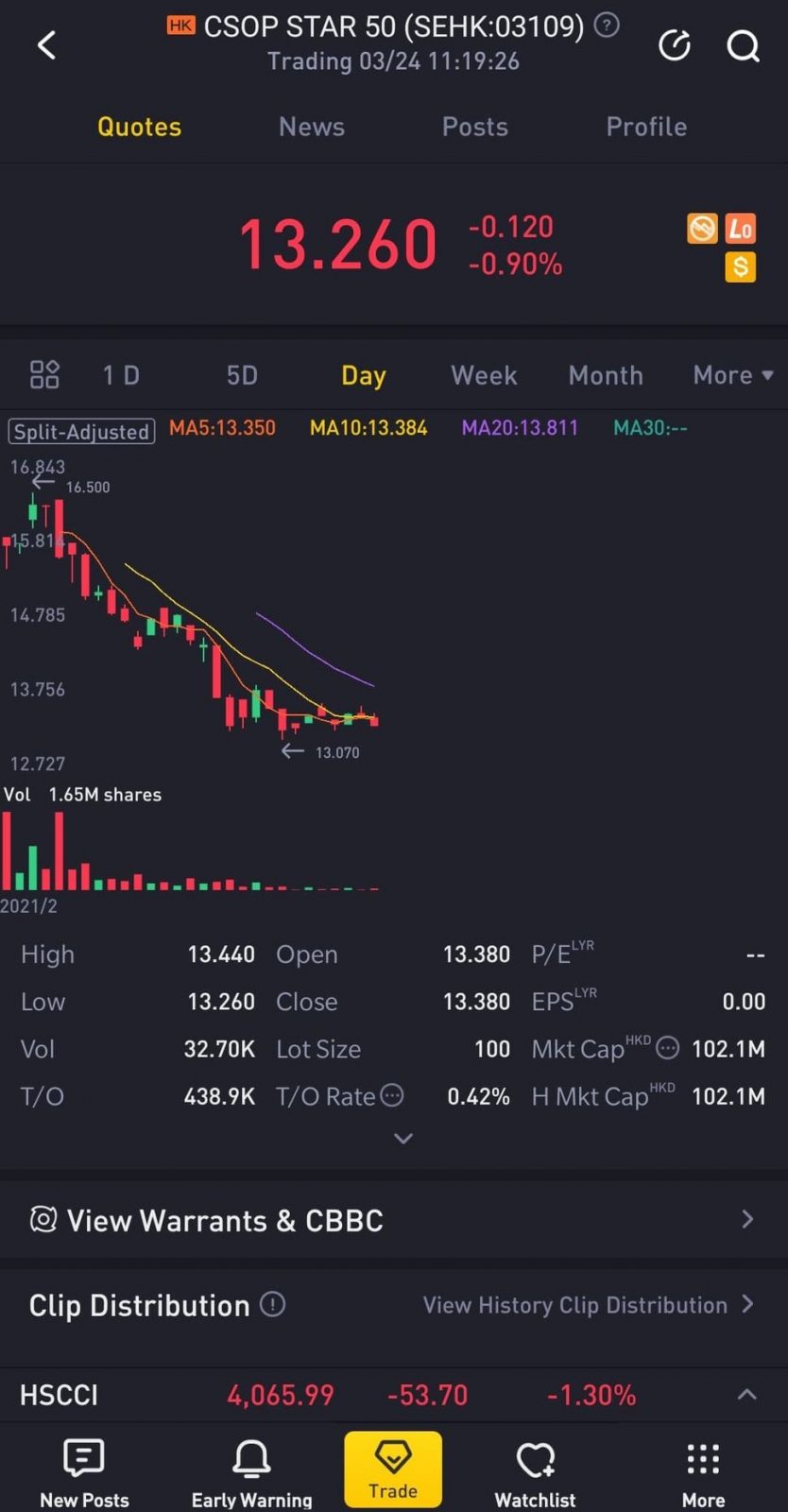
ALSO READ: How to Invest in Your First Stock via Tiger Brokers
p
No Money Lah’s Verdict
So here you go! The CSOP STAR 50 Index ETF is certainly an interesting offering for investors that have a bullish view towards China's intention to build a self-sufficient tech & innovation business ecosystem.
Tech investors, especially Chinese tech enthusiasts will be rejoiced to an easy and low capital way to invest in the Chinese tech companies. For those of you, I hope you find this article useful!
Personally, I had such a great time writing this article as I have always been interested to invest in the Chinese tech scene for a long time.
How ‘bout you? Do you have any questions on the STAR 50 Index? Feel free to let me know your thoughts & questions in the comment section below!
About CSOP Asset Management
I first discovered the STAR 50 Index through CSOP Asset Management (AM).
If you have been investing purely in the Malaysia or US market, it is likely that you have not heard of CSOP AM before. However, CSOP AM is huge in the China & Hong Kong market:
- Established in 2008, CSOP AM is the first offshore entity established by a regulated Chinese asset manager with Hong Kong’s Securities & Futures Commission (SFC) type 1 (dealing in securities), type 4 (advising on securities) and type 9 (asset management) licenses.
p - With this background, CSOP AM manages the biggest renminbi (RMB) equity & fixed income ETF listed in offshore China.
p - In late 2019, CSOP AM sets up their office in Singapore, with the goal to bring China’s gradually opening capital market to Southeast Asia’s investors (psst… that’s us).
In essence, through CSOP AM ETFs, foreign investors like you and me have the opportunity to gain exposure to China’s growing capital market.
Disclaimer
The purpose of this post is purely for sharing and should NEVER be taken as a buy/sell recommendation. Please do your own research AND/OR reach out to a licensed financial planner before making any investment decision.